Drone Path
Table of Contents
Overview
After taking the Terminal Transmission Node (TTN) to the DMZ, we find Chimney Scissorsticks at the bottom who has intel on what Wombley's doing in the toy factory, and needs help finding an admin password hidden in drone flight logs.
Introduction
Chimney Scissorsticks
Hey. Psst, over here. Hey, I'm Chimney Scissorsticks.
I'm not liking all the tension brewing between the factions, so even though I agreed with how Wombley was handling things, I get the feeling this is going to end poorly for everyone. So I'm trying to get this data to Alabaster's side. Can you help?
Wombley's planning something BIG in that toy factory. He's not really making toys in there. He's building an armada of drones!
They're packed with valuable data from the elves working on the project. I think they hide the admin password in the drone flight logs. We need to crack this to prevent this escalating snowball showdown.
You'll be working with KML files, tracking drone flight paths. Intriguing, right? We need every detail to prepare for what's ahead!
Use tools like Google Earth and some Python scripting to decode the hidden passwords and codewords locked in those files.
Ready to give it a go? It's going to be a wild ride, and your skills might just turn the tide of this conflict!
Initial Analysis
Upon opening the challenge, we're greeted with a website. From the navigation bar we can see there are three public pages:
- Home
- FileShare
- Login
On the FileShare page, there is a link to download fritjolf-Path.kml.
Silver
Silver Analysis
KML is a file format for storing geolocation data.
Let's load this file in Google Earth. Once the image it loaded, Google Earth automatically zooms to it and we can see a word: GUMDROP1.
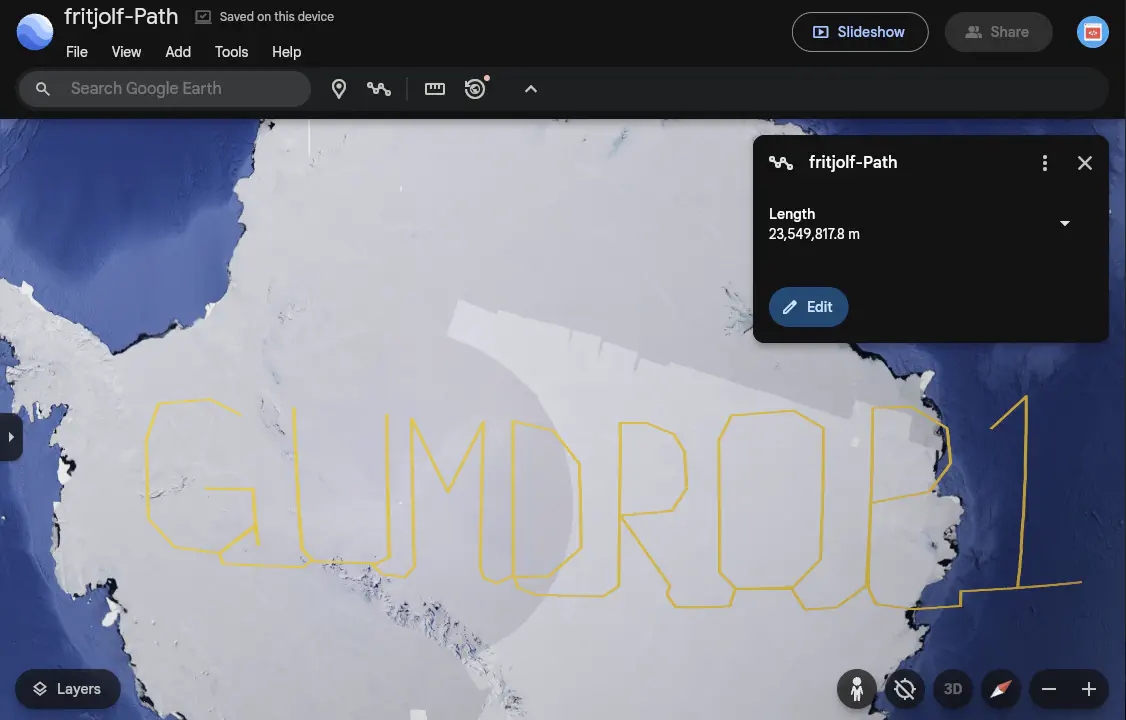
This looks like a password. We can use the fritjolf as the username since it is part of the file name.
Login Credentials
Let's use these credentials in the Login page:
We now have access to additional pages:
- Workshop
- Profile
- Admin
The Profile Page provides an Avatar and the following Info:
Username: fritjolf
Bio: Secret project is underway, we need to produce as many as possible for Wombley.
Note to self, remember drone name, it is the same location as secret snowball warehouses
/files/secret/Preparations-drone-name.csv
We have a link to download the Preparations-drone-name.csv file.
The CSV file contains eight (8) different geo locations. We can convert these coordinates to 8 points in a KML file using the from-csv-to-kml-points.py Python script and visualize them in Google Mpas.
These points do not "draw" a word like the previous file. Instead, they are several locations in Australia. When viewed in Satellite mode, we can see that the terrain forms a letter for each location.
| Pos | Latitude | Longitude | Link | Letter |
|---|---|---|---|---|
| 1 | -37.42277804382341 | 144.8567879816271 | Google Maps | E |
| 2 | -38.0569169391843 | 142.4357677725014 | Google Maps | L |
| 3 | -37.80217469906655 | 143.9329094555584 | Google Maps | F |
| 4 | -38.0682499155867 | 142.2754454646221 | Google Maps | - |
| 5 | -34.52324587244343 | 141.756352258091 | Google Maps | H |
| 6 | -36.74357572393437 | 145.513859306511 | Google Maps | A |
| 7 | -37.89721189352699 | 144.745994150535 | Google Map | W |
| 8 | -37.00702150480869 | 145.8966329539992 | Google Maps | K |
The complete word is:
This looks like a drone name. Let's look for it in the Workshop page.
Search for Drone
Let's go to the Elf Drone Workshop and enter ELF-HAWK in the Search for a Drone field.
Drone Details
Name: ELF-HAWK, Quantity: 40, Weapons: Snowball-launcher
Comments for ELF-HAWK
- These drones will work great to find Alabasters snowball warehouses. I have hid the activation code in the dataset
ELF-HAWK-dump.csv. We need to keep it safe, for now it's under /files/secret.- We need to make sure we have enough of these drones ready for the upcoming operation. Well done on hiding the activation code in the dataset. If anyone finds it, it will take them a LONG time or forever to carve the data out, preferably the LATTER.
We have a link to download the ELF-HAWK-dump.csv file.
There are over 3,000 records. If we look at the values, we can see that the longitude values go up to over 1,500 which is strange because the values should only go from -180 to 180 degrees.
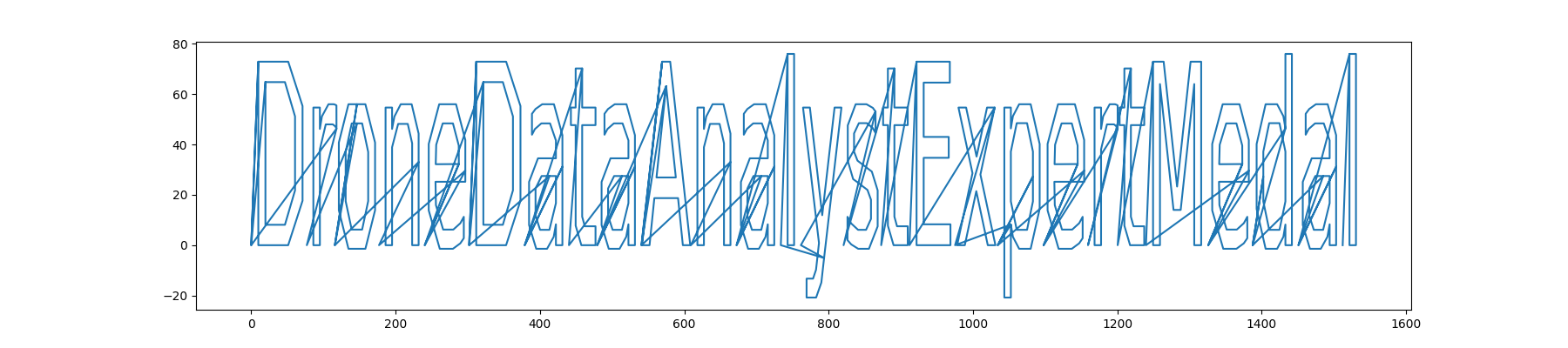
Let's convert the coordinates in the ELF-HAWK-dump.csv file to a path in the ELF-HAWK-dump-Path.kml KML file using the from-csv-to-kml-path.py Python script and load it to a KML viewer that projects the points onto a flat surface, e.g., a QGIS desktop app.
Another option is to use the from-cvs-to-plot.py Python script to plot the coordinates from the CSV file using matplotlib.
Silver Solution
Flag (Silver): The last set of coordinates draw a path that makes the word DroneDataAnalystExpertMedal.
Let's go to the Admin Code Verification Console and enter this value in the Submit your code for drone fleet administration field.
After pressing the Submit button, we get the message:
Success: Code accepted! You may now steer the fleet of drones. You are officially certified as a Drone Data Analyst Expert!
Gold
Bravo! You've tackled the drone challenge and navigated through those KML files like a true expert. Your skills are just what we need to prevent the big snowball battle—the North Pole thanks you!
Well done! You cracked the code from the drones and showed you've mastered the basics of KML files. This kind of expertise will be invaluable as we gear up for what's ahead!
But I need you to dig deeper. Make sure you're checking those file structures carefully, and remember—rumor has it there is some injection flaw that might just give you the upper hand. Keep your eyes sharp!
Gold Analysis
The new message hints at some injection vulnerability.
Let's go back to the Elf Drone Workshop page and check for vulnerabilities in the search field.
If we enter a quote (') in the input field, we see in the DevTools that a request is sent to /drones?drone=%27 and fails with a 500 Internal Server Error. This hints at some SQL injection vulnerability.
Searching for drone name ELF-HAWK' or 1=1 -- returns all the drone names and the comments for the last drone:
Drone Details
- Name: ELF-HAWK, Quantity: 40, Weapons: Snowball-launcher
- Name: Pigeon-Lookalike-v4, Quantity: 20, Weapons: Surveillance Camera
- Name: FlyingZoomer, Quantity: 4, Weapons: Snowball-Dropper
- Name: Zapper, Quantity: 5, Weapons: CarrotSpike
Comments for Zapper
- This is sort of primitive, but it works!
In the DevTools, we can see the requests for all the drones:
{
    "comments": [
        "These drones will work great to find Alabasters snowball warehouses.\n I have hid the activation code in the dataset <a href='../files/secret/ELF-HAWK-dump.csv'>ELF-HAWK-dump.csv</a>. We need to keep it safe, for now it's under /files/secret.",
        "We need to make sure we have enough of these drones ready for the upcoming operation. \n Well done on hiding the activation code in the dataset.\n If anyone finds it, it will take them a LONG time or forever to carve the data out, preferably the LATTER."
    ],
    "drone_name": "ELF-HAWK"
}
{
    "comments": [
        "This is a great drone for surveillance, but we need to keep it out of the rain.",
        "I cant believe we are using pigeons for surveillance. \n If anyone finds out, there will most likely be a conspiracy theory about it.",
        "I heard a rumor that there is something fishing with some of the files. \nThere was some talk about only TRUE carvers would find secrets and that FALSE ones would never find it."
    ],
    "drone_name": "Pigeon-Lookalike-v4"
}
{
    "comments": [
        "This drone is perfect for dropping snowballs on unsuspecting targets."
    ],
    "drone_name": "FlyingZoomer"
}
Pigeon-Lookalike-v4 give us a hint, i.e., TRUE and FALSE are capitalized, likely referring to the many boolean values in the ELF-HAWK-dump.csv file.
Gold Solution
Based on the hint, we are probably looking for binary values to convert to ASCII characters to create ASCII art. Hence, let's execute these steps:
1. Extract all TRUE and FALSE values from the ELF-HAWK-dump.csv file.
2. Replace TRUE with 1 and FALSE with 0.
3. Remove any whitespace from the output to create a seamless list of 1 and 0 values, e.g., 0011101...
4. Transform the binary data into ASCII characters to reveal the message.
Using Python
The extract_bool_data.py Python script loads the ELF-HAWK-dump.csv file and creates the output_binary.txt file with al the 0 and 1 values and the final output_ascii.txt file with the ASCII art.
Using BASH
The following command will process the ELF-HAWK-dump.csv file and print the ASCII art to the console:
grep -oE "TRUE|FALSE" ELF-HAWK-dump.csv | sed 's/TRUE/1/g; s/FALSE/0/g' | tr -d '\n' | fold -w8 | while read -r byte; do echo "$((2#$byte))"; done | awk '{printf "%c", $1}'
Using CyberChef
The following CyberChef recipeFind_/Replace(%7B'option':'Regex','string':'TRUE'%7D,'1',true,false,true,false)Find/_Replace(%7B'option':'Regex','string':'FALSE'%7D,'0',true,false,true,false)Remove_whitespace(true,true,true,true,true,false)From_Binary('Space',8)) will execute all the steps to produce the ASCI art.
1. Load the ELF-HAWK-dump.csv file.
2. Create a RegEx to extract all the TRUE|FALSE values.
Regular expression
------------------
Built in regexes: User Defined
Regex: TRUE|FALSE
Case Insensitive: ON, ^ and $ match at newlines: ON (all the other options OFF)
Output format: List matches
Find / Replace
--------------
Find: TRUE (REGEX)
Replace: 1
Global Match: ON, Multiline matching: ON (all the other options OFF)
Find / Replace
--------------
Find: FALSE (REGEX)
Replace: 0
Global Match: ON, Multiline matching: ON (all the other options OFF)
Remove whitespace
-----------------
Spaces: ON, Carriage returns (\r): ON, Line feeds (\n): ON, Tabs: ON, Form feeds (\f): ON
Full stops: OFF
Flag (Gold): The code that comes up from the ASCII art is:
Let's go to the Admin Code Verification Console and enter this value in the Submit your code for drone fleet administration field.
After pressing the Submit button, we get the message:
Success: Code accepted! You may now take over the production of drones. You are officially certified as Super Admin Drone Data Analyst Expert!
Outro
Chimney Scissorsticks
Absolutely fantastic! I think you found the most difficult path in, from file carving to SQL injection. Not many can do that, but you've shown you're ready for anything the factions throw your way!
Alabaster Snowball
Drones? They have drones!? Snowball-dropping drones!? Where is Wombley getting the resources for this tech with so few elves on his side?
What's that? Chimney gave you this intel, and he's become a double agent? That's wonderful! We must be winning some of them over. Hearts and minds, that's how we'll triumph.
Wombley is not going to like that we have kept him at bay and prevented him from getting the Naughty-Nice List. The elves have reported that he seems to be preparing for something big.
I told Sparkle to send a distress message to Santa on NASA's Deep Space Network. I hope he receives it and returns in time before Wombley does something drastic.
Wombley Cube
I received intel that we may have a double agent in our ranks. Do you know who it is?
No? Hm… I'm not sure I trust you. I even think it's likely you're the culprit. I have my spies' eyes on you…
Files
| File | Description |
|---|---|
fritjolf-Path.kml |
KML file downloaded from the FileShare page with a flight path spelling GUMDROP1 |
Preparations-drone-name.csv |
CSV with 8 geo-coordinates |
Preparations-drone-name-Points.kml |
KML points file generated from Preparations-drone-name.csv showing letters in satellite view forming the Drone Name ELF-HAWK |
ELF-HAWK-dump.csv |
Large drone telemetry dump containing an admin code and hidden boolean steganography |
ELF-HAWK-dump-Path.kml |
KML flight path generated from ELF-HAWK-dump.csv with the admin code to plot |
ELF-HAWK-dump-plot.png |
The plot for the path from ELF-HAWK-dump.csv making the admin code DroneDataAnalystExpertMedal for the Silver flag |
output_binary.txt |
Extracted TRUE/FALSE values converted to binary string |
output_ascii.txt |
Binary string decoded to ASCII art revealing the admin code EXPERTTURKEYCARVERMEDAL for the Gold flag |
from-csv-to-kml-path.py |
Script to convert CSV coordinates to a KML LineString path |
from-csv-to-kml-points.py |
Script to convert CSV coordinates to KML point placemarks |
from-cvs-to-plot.py |
Script to plot CSV coordinates using matplotlib |
extract_bool_data.py |
Script to extract TRUE/FALSE values and decode to ASCII |
References
ctf-techniques/web/sqli/— SQL injection technique reference used in Goldctf-techniques/forensics/— data extraction and steganography techniques- Google Earth — used to visualise KML flight paths
- CyberChef — used to extract and decode binary steganography
- KML reference
- simplekml Python library
Navigation
| Mobile Analysis → |